Every device that joins a network — a laptop borrowing a printer, a phone pulling files from a shared drive, or a thousand employee workstations logging into a corporate domain — relies on an underlying blueprint that decides who controls what, how identities are verified, and how resources get shared. That blueprint is called networking architecture, and getting it right is one of the most consequential decisions an IT team ever makes.
Pick the wrong model and you end up with a home office trying to run enterprise-grade security through ad-hoc folder sharing, or a 500-person company still relying on a workgroup setup that was only ever meant for five computers. Pick the right one, and authentication, scalability, and day-to-day administration almost take care of themselves.
In this guide, we break down the three foundational networking architecture models — Peer-to-Peer (P2P), Client-Server, and Domain-Based networking — explain how each one actually works, compare their strengths and weaknesses side by side, and walk through a practical framework for choosing the right architecture for your home, business, or growing enterprise.
What Is Networking Architecture?
Networking architecture is the organizational design that governs how computers, servers, and other devices on a network communicate, share resources, and manage access permissions. It answers three core questions for any network: Who is allowed to use which resource? Who verifies a user’s identity? And which machine, if any, holds central authority over the rest?
Computer networks are typically classified into three management models based on how they answer those questions:
- Peer-to-Peer (P2P) networking — a decentralized model with no dedicated authority
- Client-Server networking — a hybrid model where dedicated machines provide specific services
- Domain-Based networking — a fully centralized model built around directory services such as Active Directory
| Quick Definition Networking architecture is the framework that determines how devices on a network authenticate, communicate, and share resources — and which machine, if any, is in charge of enforcing the rules. |
Peer-to-Peer (P2P) Networking Architecture
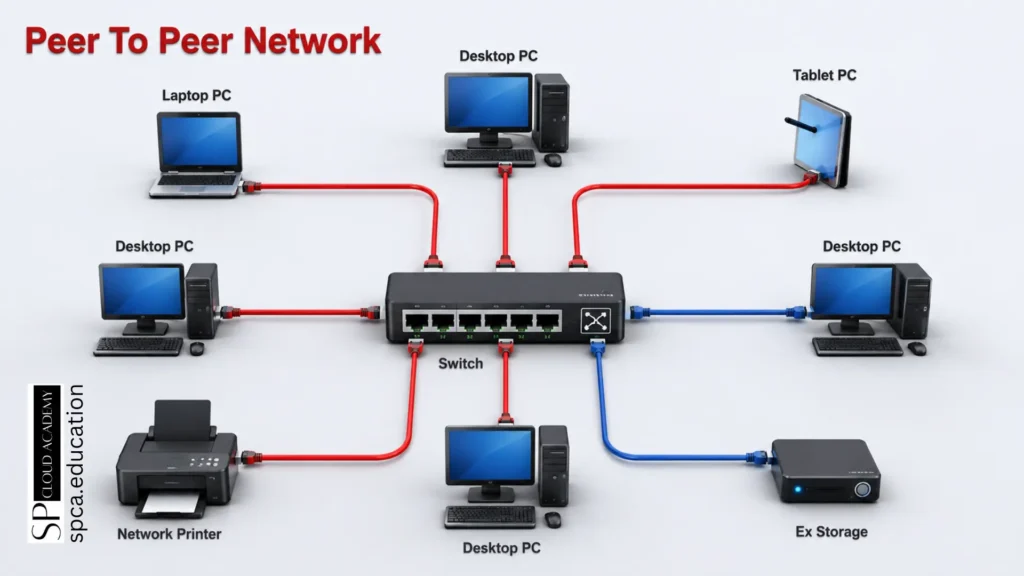
A Peer-to-Peer network is the simplest form of networking architecture. Every device on the network — desktops, laptops, tablets, printers — is treated as an equal. There is no dedicated server and no central authority; instead, machines are grouped into a shared workgroup (Windows networks default this group name to WORKGROUP) and each device decides for itself which of its own files, folders, or printers to share with the rest of the group.
Because no single computer is responsible for authentication or access control, setting up a P2P network is fast and requires almost no specialized IT knowledge. The trade-off is that security and oversight are scattered across every individual machine instead of being managed in one place.
Key Characteristics of Peer-to-Peer Networks
- Workgroup-based structure with no domain or central directory
- Clients and servers are not differentiated — every device can both request and provide resources
- No dependency on any single machine; if one device goes offline, the rest keep working
- No centralized identity and access management (IAM)
- No centralized access control — sharing permissions are set individually on each machine
Where Peer-to-Peer Architecture Works Best
- Home networks and small households sharing a printer or NAS drive
- Very small offices with fewer than 10–15 devices and no dedicated IT staff
- Temporary or ad-hoc setups, such as a small workshop or classroom lab
- Distributed file-sharing protocols (e.g., BitTorrent-style transfers) that intentionally avoid a central server
| Pros | Cons |
| Inexpensive and fast to set up | Difficult to scale beyond a handful of devices |
| No dedicated server hardware required | No centralized security policy or audit trail |
| Simple for non-technical users to manage | Backup and recovery depend on each individual machine |
| Network keeps functioning if one device fails | Inconsistent permissions across shared resources |
Client-Server Networking Architecture
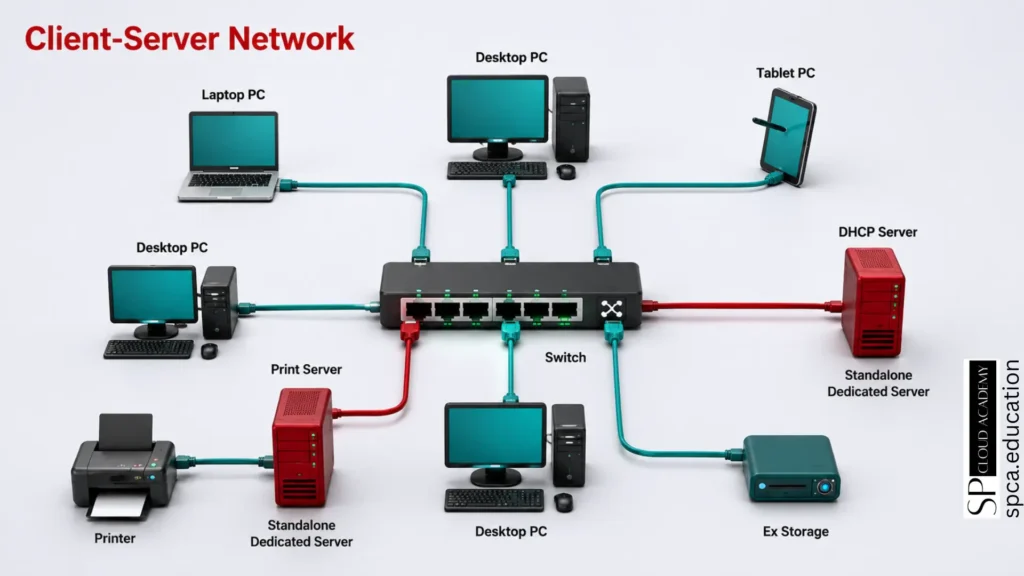
A Client-Server network introduces a layer of specialization. One or more dedicated server machines are set up to provide a specific service — file storage, printing, DHCP address assignment, web hosting — while client devices consume that service. Unlike domain-based networks, however, no single server holds central authority over the entire network; each server independently manages its own slice of the infrastructure.
This middle-ground architecture is still organized as a workgroup rather than a domain, but it solves the biggest weakness of P2P networking: resource-heavy or security-sensitive services are consolidated onto purpose-built machines instead of being scattered across every desktop.
Key Characteristics of Client-Server Networks
- Workgroup in nature, but clients and servers are clearly differentiated
- At least one dedicated server is present (file server, print server, DHCP server, etc.)
- Clients depend on specific servers for specific services, not for everything
- Still lacks a centralized identity and access management layer
- Still lacks unified, network-wide access control
Where Client-Server Architecture Works Best
- Small-to-medium businesses that need dedicated file, print, or DHCP services
- Web and application hosting, where a server answers requests from many client browsers
- Database-driven applications where multiple clients query a central database server
- Organizations not yet ready to invest in a full directory-services rollout
| Pros | Cons |
| More scalable than peer-to-peer networking | Still no network-wide identity or access management |
| Centralizes specific services for easier maintenance | Each server must be administered somewhat independently |
| Better performance for resource-intensive tasks | A server outage can disrupt the specific service it provides |
| Clear separation of duties between clients and servers | Higher cost than P2P due to dedicated server hardware |
Domain-Based Networking Architecture
A Domain-Based network represents the fully centralized end of the spectrum. Permissions, authentication, and resource access across the entire network are managed by one or more domain controllers — servers that maintain a hierarchical directory of users, devices, and the permissions assigned to each. Microsoft’s Active Directory is the most widely deployed example of this model, though cloud-based directory services such as Microsoft Entra ID follow the same underlying principle.
Because the domain controller enforces rules network-wide, administrators can assign permissions that map directly onto an organization’s structure — granting the finance department access to financial systems, for example, while keeping that same data invisible to other departments, all from a single management console.
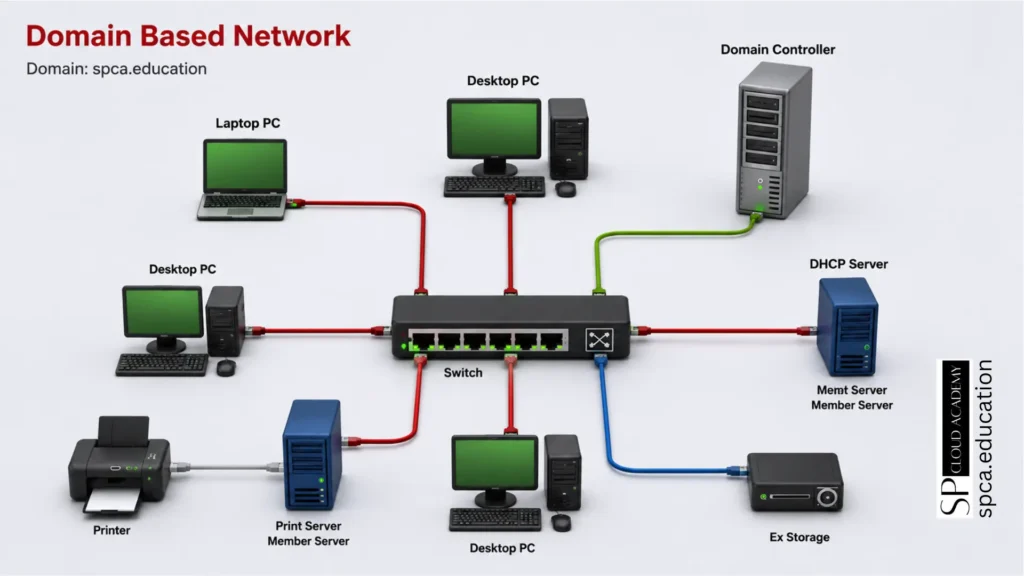
Key Characteristics of Domain-Based Networks
- Client-server in nature, but with a centralized control layer governing the whole network
- Clients and servers are clearly differentiated
- Every device on the network connects through a shared domain
- Devices need explicit authorization to join the domain in the first place
- The network is managed end-to-end by one or more domain controllers (DCs)
- Centralized identity and access management, typically via Active Directory or an equivalent directory service
Where Domain-Based Architecture Works Best
- Mid-size to large enterprises with dozens, hundreds, or thousands of devices
- Organizations that need consistent, network-wide security policy enforcement
- Regulated industries such as finance, healthcare, and education that require audit trails and access governance
- Any business expecting significant headcount or device growth in the near future
| Pros | Cons |
| Centralized identity and access management across the entire network | Higher upfront cost and infrastructure complexity |
| Consistent security policies enforced from one console | Requires dedicated IT expertise to configure and maintain |
| Scales smoothly to thousands of users and devices | Domain controller outages can affect authentication network-wide |
| Detailed audit trails support compliance requirements | Overkill for very small networks with minimal security needs |
Side-by-Side Comparison: P2P vs. Client-Server vs. Domain-Based
The table below distills the core differences between all three networking architecture models across the criteria that matter most when making a decision.
| Criteria | Peer-to-Peer | Client-Server | Domain-Based |
| Centralized management | No | Partial | Yes |
| Dedicated server required | No | Yes, one or more | Yes, domain controller |
| Central IAM / access control | No | No | Yes |
| Typical network size | 1–15 devices | 10–100 devices | 50+ devices |
| Setup complexity | Very low | Moderate | High |
| Security oversight | Minimal, per-device | Service-level | Network-wide |
| Scalability | Low | Moderate | High |
| Best suited for | Home / small office | Small-to-medium business | Enterprise organizations |
How to Choose the Right Networking Architecture
There is no single “best” networking architecture — only the one that fits your organization’s current size, security requirements, budget, and growth trajectory. Before settling on a model, weigh these four factors:
- Network size — how many devices need to connect today, and how many will need to connect in two or three years?
- Security and compliance needs — does your industry require audit trails, access governance, or strict identity verification?
- Budget and infrastructure — can you justify the cost of dedicated servers or a domain controller, or is a workgroup setup more realistic right now?
- IT staffing — do you have, or plan to hire, the expertise needed to administer a directory service like Active Directory?
| Quick Decision Checklist Fewer than 10–15 devices, no dedicated IT staff → choose Peer-to-Peer networking.Need specific dedicated services (file, print, DHCP) but not full centralized control → choose Client-Server networking.Growing headcount, compliance requirements, or need for centralized security policy → choose Domain-Based networking with Active Directory. |
The Future of Networking Architecture
Even domain-based networking is evolving. Many organizations now run hybrid identity models that extend traditional Active Directory into cloud-based directory services such as Microsoft Entra ID, allowing authentication to follow users across on-premises and cloud resources alike. Meanwhile, zero-trust security principles are increasingly layered on top of all three architecture types, verifying every access request rather than trusting devices simply because they sit inside the network perimeter.
Software-defined networking (SDN) and AI-driven network management tools are also reshaping how administrators monitor and adjust these architectures in real time, automating tasks that once required manual configuration on every domain controller, server, or workgroup device. The underlying models — P2P, client-server, and domain-based — remain the foundation, but the tools used to manage them keep getting smarter.
Conclusion
Peer-to-Peer, Client-Server, and Domain-Based networking architecture each solve a different problem. P2P keeps things simple for small, informal setups. Client-Server adds dedicated services without the overhead of full centralization. Domain-Based networking delivers the centralized identity management and security governance that growing and regulated organizations eventually need.
The right move isn’t picking the architecture with the most features — it’s matching the model to where your network actually is today, while leaving room to grow into the next one when the time comes.
Frequently Asked Questions
What is the main difference between peer-to-peer and client-server networks?
In a peer-to-peer network, every device can act as both a client and a server with no machine holding special authority. In a client-server network, dedicated server machines provide specific services while client devices consume them, creating a clear role separation that peer-to-peer networking does not have.
Does a domain-based network always require Active Directory?
Active Directory is the most common directory service behind domain-based networks, but it is not the only option. Cloud-based identity platforms, such as Microsoft Entra ID, and other LDAP-compliant directory services can fulfill the same centralized authentication and access-control role.
Can a network use more than one architecture type at once?
Yes. Many real-world networks are hybrids — for example, a domain-based enterprise network that still allows small peer-to-peer file sharing between two colleagues’ laptops, or a client-server setup for a specific application layered on top of a broader domain environment.
Is client-server architecture more secure than peer-to-peer?
Generally, yes. Centralizing services on dedicated servers makes it easier to apply consistent security configurations and monitor access, but client-server networks still lack the network-wide identity and access management that domain-based architecture provides.
What is the best networking architecture for a growing startup?
Most startups begin with a simple peer-to-peer or client-server setup and migrate to domain-based networking once headcount, compliance needs, or security requirements outgrow informal access management. Planning that migration path early avoids a disruptive overhaul later.