NAS (Network Attached Storage) and cloud storage both let you store, access, and share files. Where they differ is in where your data lives, how you reach it, how much control you keep, and how you pay for it. This article walks through both options in depth, compares them side by side, and helps you decide which one fits your needs, or whether you should use both.
What Is a NAS?
A NAS is a dedicated storage device connected to your home, office, or institutional network. It is your own storage on your own network. You manage its drives, user accounts, permissions, and backups, which gives you a high degree of control but also makes you responsible for its upkeep.
Popular examples include Synology and QNAP devices, as well as systems built on TrueNAS.
How a NAS Works

Computers and mobile devices connect over a local network (Ethernet or Wi-Fi) to the NAS device, which holds the storage drives. Because everything happens on your local network, files remain accessible even if your internet connection goes down, as long as the local network and the NAS itself are still running.
What Is Cloud Storage?
Cloud storage is storage managed by a service provider. Your files sit on remote infrastructure operated by the provider and are accessed over the internet or through supported network connections.
Well-known examples include Google Drive, Microsoft OneDrive, Dropbox, and Amazon S3.
How Cloud Storage Works

Your device connects over the internet to the provider’s servers. Files are generally reachable from many locations, subject to connectivity, account access, and service availability. Some services also support offline files, so you can keep working when you are disconnected.
NAS vs Cloud Storage at a Glance
| Feature | NAS | Cloud storage |
| Storage location | Your device and premises | Provider’s data centers |
| Initial cost | Usually higher | Usually low or zero |
| Ongoing cost | Electricity, maintenance, drive replacement | Subscription or usage fees |
| Internet required | No for local access; yes for remote access | Usually yes |
| Storage capacity | Expandable within hardware limits | Often scalable through a plan |
| Data control | High, depending on configuration | Shared with the provider’s service model |
| Access from anywhere | Requires remote access setup | Usually built in |
| Performance | Fast on a suitable local network | Depends on internet speed and service |
| Maintenance | Your responsibility | Mostly provider-managed |
| Collaboration | Depends on software and setup | Often built in |
| Data privacy | You control much of the infrastructure | Depends on provider, encryption, and account security |
| Disaster recovery | Requires separate backup planning | Provider redundancy may help, but separate backup may still be needed |
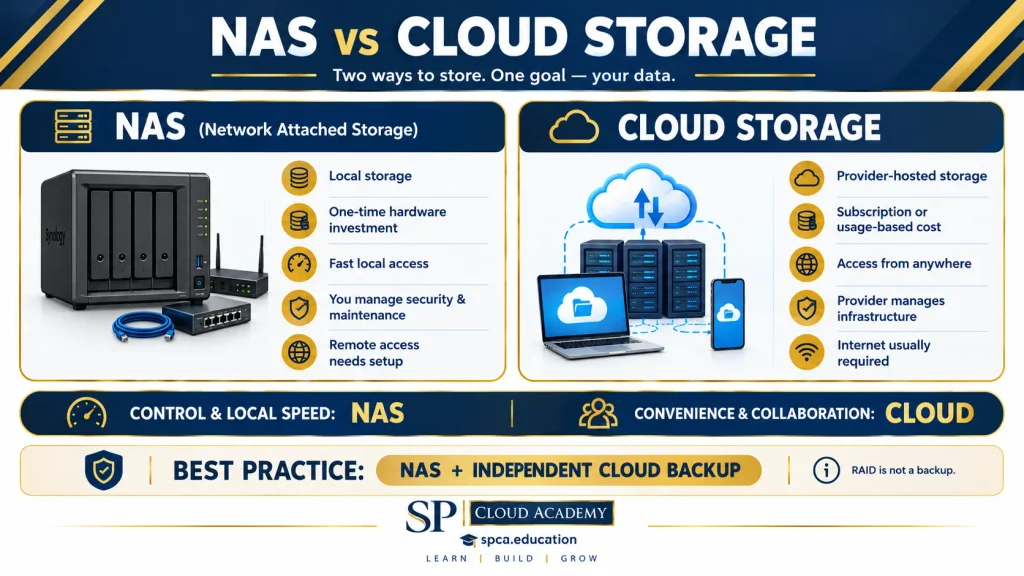
Key Differences Explained
Location and Control
With a NAS, your data lives on hardware you own, on premises you control. You decide who has access, how data is organized, and which software runs on the device. With cloud storage, your data lives in the provider’s data centers and is governed in part by the provider’s service model. That trade-off buys you convenience, but you hand over some control.
Access and Connectivity
A NAS is fast and fully available on the local network without needing the internet. Reaching it from outside that network requires setting up remote access. Cloud storage is the reverse: remote access is usually built in, but you generally need an internet connection to use it, apart from any files you have made available offline.
Performance
On a suitable local network, a NAS can deliver excellent speeds, which matters for large files and video work. Cloud performance depends on your internet speed and the quality of the service, so large transfers can be slow on limited connections.
Maintenance and Responsibility
A NAS puts maintenance in your hands: updating software, monitoring drives, replacing failed disks, and configuring backups. Cloud providers handle the underlying hardware and infrastructure for you, which removes most of that burden.
Collaboration
Cloud platforms often include real-time collaboration and sharing out of the box. On a NAS, collaboration depends on the software you install and how you configure it.
Capacity and Scaling
A NAS can be expanded, but only within the limits of its hardware, and growth means buying and installing more drives. Cloud storage typically scales by upgrading your plan or paying for additional capacity, with no hardware to purchase.
Which Is Better for Different Needs?
Choose NAS For
- Large personal or organizational file libraries.
- Centralized storage for multiple computers.
- Local media streaming and large video projects.
- Private file sharing with greater infrastructure control.
- Long-term storage where recurring per-terabyte subscription fees are undesirable.
Choose Cloud Storage For
- Accessing files while traveling or working remotely.
- Sharing documents and collaborating in real time.
- Automatic synchronization across devices.
- Avoiding hardware maintenance.
- Scaling storage without purchasing and installing drives.
Choose Both For
- Business-critical files.
- Educational institutions and digital learning resources.
- Large media archives that also need remote access.
- A stronger backup and disaster-recovery strategy.
Cost Comparison: Short-Term vs Long-Term
| Cost factor | NAS | Cloud storage |
| Initial investment | Device, drives, possibly a UPS | Often none |
| Monthly payment | Usually no storage subscription required | Commonly recurring |
| Scaling up | Purchase additional drives or hardware | Upgrade plan or pay for additional capacity |
| Hidden costs | Power, maintenance, replacement drives | Data transfer, premium features, or additional storage |
| Long-term economics | Can be economical for large datasets | Convenient, but recurring costs can accumulate |
In the short term, cloud storage is usually cheaper to start because it requires little or no upfront spending. Over the long term, a NAS can become more economical for large datasets, since you avoid recurring per-terabyte fees.
An important caveat: NAS is not automatically cheaper, and cloud storage is not automatically more expensive. The outcome depends on storage capacity, usage, redundancy, maintenance, internet access, and how many years you retain the data. Run the numbers for your own situation, including electricity, replacement drives, and any transfer or premium-feature fees.
Security and Backup: An Essential Distinction
Neither option guarantees that your files are safe simply because they are stored there. Each needs its own protective habits.
- NAS: Use strong authentication, keep software updated, restrict remote access, and enable snapshots where supported.
- Cloud: Use multifactor authentication, set suitable sharing permissions, and apply encryption appropriate to your requirements.
- Both: Keep an independent backup.
Two misconceptions are worth calling out. RAID protects against certain drive failures, but it is not a substitute for backup. And cloud synchronization can propagate accidental deletions or ransomware changes to every connected device, so sync is not backup either.
The 3-2-1 Backup Rule
A practical strategy is the 3-2-1 rule: keep three copies of important data, on two different types of storage, with one copy off-site. A NAS plus a cloud backup satisfies this neatly.
Final Verdict
- Best for control and local storage: NAS. Ideal when you want a central storage system, high local-network performance, and control over your infrastructure.
- Best for convenience and collaboration: cloud storage. Ideal when you need simple remote access, sharing, synchronization, and minimal hardware management.
- Best for resilience: NAS plus cloud backup. Keep working files on your NAS and replicate or back up critical data to an independent cloud destination.

UGREEN DXP4800 Plus 4-Bay NAS for Families, Creators & Small Teams
4K Home Media, File Server & Hardware Transcoding, Intel 8505, 8GB DDR5, 10GbE&2.5GbE, Built-in 128G SSD, 2xM.2 NVMe,Diskless
Conclusion
The choice is less about which technology is superior and more about what you value: control and local speed, or convenience and effortless access. In one sentence: NAS gives you storage infrastructure you manage, while cloud storage gives you storage as a service. For anything you cannot afford to lose, combining the two gives you the strongest protection.
See Also
-

NAS vs Cloud Storage: A Complete Comparison
-

Microsoft 365 vs. Microsoft Standalone Office Suite: Which One Will Boost Your Productivity?
-

Remote Desktop Software in 2026: Transforming Remote Work, IT Support & Business Productivity
-

Transform Team Productivity: How Microsoft SharePoint and Google Sites Are Revolutionizing Modern Project Management
-

Building a Secure Digital Workplace with Microsoft 365:Complete Architecture Explained
-

Microsoft Teams Premium: Smarter Meetings, Stronger Security, Bigger Results
-

Microsoft Teams Explained: The Ultimate Beginner’s Guide
-

Microsoft Teams Channels vs. Chat: The Ultimate Guide to Choosing the Right Communication Tool
-

Granola AI: The Meeting Assistant That Writes Better Notes Than You (And Why That’s Actually a Good Thing)