Ask five people what a ‘network professional’ actually does, and you’ll likely get five different answers. That’s because networking isn’t one job — it’s a career ladder with distinct rungs, each demanding a different depth of skill, a different scope of responsibility, and a different way of thinking about infrastructure. In 2026, as organizations lean harder into cloud networking, SD-WAN, zero trust, and AI-driven operations, the gap between these rungs has only gotten wider.
This guide breaks down the four core stages of a networking career — Network Technician, Network Administrator, Network Engineer, and Network Architect — and maps out exactly what separates them: responsibilities, technical skill sets, tools, typical years of experience, and the certifications that validate each level. Every responsibility and skill below includes a short, plain-language explanation, so you know not just what to learn, but why it matters at that stage of your career.
Quick Overview: The Four Levels of a Networking Career
| Role | Level | Experience | Core Focus |
| Network Technician | Foundation | 0–2 years | Install, cable, configure, and troubleshoot hardware |
| Network Administrator | Operational | 2–4 years | Manage, monitor, and secure day-to-day network operations |
| Network Engineer | Professional | 4–8 years | Design, implement, and optimize advanced networks |
| Network Architect | Expert | 8+ years | Define enterprise strategy, architecture, and technology roadmap |
Network Technician — Foundation Level (0–2 Years)
Every network career starts here. The Network Technician is the hands-on foundation of IT infrastructure — the person who installs the hardware, runs the cables, and keeps the physical and basic logical layers of the network functioning.
Key Responsibilities
- Installing and configuring network hardware — Setting up switches, routers, and access points so they’re ready for production use.
- Terminating cables (UTP and fiber) — Preparing and connecting copper and fiber cabling to industry wiring standards.
- Basic router and switch configuration — Applying initial device settings so hardware communicates correctly on the network.
- Troubleshooting Layer 1 and Layer 2 issues — Diagnosing physical and data-link problems such as bad cables, faulty ports, or duplex mismatches.
- Wi-Fi setup and end-user support — Deploying wireless coverage and resolving everyday connectivity complaints from staff.
- Hardware replacement and maintenance — Swapping failed components and keeping equipment clean, cooled, and in working order.
Skills Set
Networking Fundamentals
- OSI Model — The seven-layer framework used to describe how devices communicate on a network.
- TCP/IP basics — The core protocol suite that governs how data actually moves across networks.
- IPv4, basic IPv6 — The addressing systems used to uniquely identify devices on a network.
- Subnetting basics — Dividing a larger network into smaller, more manageable address blocks.
- Ethernet fundamentals — The dominant wired standard for connecting devices within a local network.
- VLAN basics — Logically separating a single physical network into isolated broadcast domains.
Hardware & Devices
- Switches (Cisco, HP, etc.) — The devices that connect endpoints together within a local network segment.
- Routers — Devices that forward traffic between separate networks, such as LAN and internet.
- Wireless access points — Hardware that extends wired network connectivity out over Wi-Fi.
- Patch panel & rack — Physical infrastructure used to organize and terminate structured cabling neatly.
- Fiber optic basics — Handling, cleaning, and terminating high-speed fiber-optic connections safely.
Tools & Utilities
- Crimping tool — Used to attach RJ45 connectors onto the ends of network cables.
- Cable tester — Verifies that a finished cable run is wired correctly and passing signal.
- Fluke tester — A professional-grade tool for certifying cable performance against industry standards.
- PuTTY, Winbox — Terminal and configuration tools used to access and set up network devices.
- Basic network scanners — Simple tools for discovering connected devices and checking basic connectivity.
Soft Skills
- Documentation — Recording configurations, changes, and issues so others can follow your work.
- Communication — Explaining technical problems clearly to non-technical colleagues and end users.
- Customer support — Assisting staff with day-to-day connectivity and hardware issues patiently.
- Time management — Prioritizing and completing multiple support tickets within reasonable timeframes.
Recommended Certifications: Cisco CCST Networking, CompTIA Network+
Network Administrator — Operational Level (2–4 Years)
Once you’ve mastered the fundamentals, the next step is taking ownership of a live network’s daily operation. The Network Administrator keeps systems running, users connected, and security policies enforced across the organization.
Key Responsibilities
- Monitoring and maintaining the network — Keeping an eye on uptime, performance, and capacity across live infrastructure.
- Managing users, devices, and policies — Controlling who and what can access the network, and under what rules.
- Configuring VPNs and firewalls — Setting up secure remote access and perimeter defenses for the organization.
- Ensuring network security and backups — Applying security controls and keeping recoverable copies of critical configurations.
- Managing DNS, DHCP, and IP services — Administering the core services that assign addresses and resolve names.
- Maintaining server and network connectivity — Making sure servers and network segments stay reachable and performant.
Skills Set
Routing & Switching
- VLAN, trunking — Segmenting traffic logically and carrying multiple VLANs across a single link.
- STP, RSTP, MSTP — Spanning-tree protocols that prevent loops in redundant switched networks.
- EtherChannel (LACP) — Bundling multiple physical links into one logical, higher-bandwidth connection.
- Static routing — Manually defining fixed paths for traffic between networks.
- OSPF (single area) — A dynamic routing protocol that automatically learns and shares network paths.
- Basic BGP concepts — An introductory understanding of the protocol that routes traffic across the internet.
Network Services
- DHCP, DNS — Services that automatically assign IP addresses and resolve domain names.
- NAT, PAT — Techniques that translate private addresses so devices can reach the internet.
- ACLs (Access Control Lists) — Rule sets that permit or deny traffic based on defined criteria.
- VPN (IPSec, SSL) — Encrypted tunnels that let remote users and sites connect securely.
- QoS basics — Prioritizing certain types of traffic to protect performance for critical apps.
Security
- Firewall administration — Configuring and maintaining rules that control traffic entering and leaving the network.
- IPS/IDS basics — Understanding tools that detect and block suspicious network activity.
- User and access management — Granting, reviewing, and revoking user permissions across systems.
- Backup and recovery — Ensuring data and configurations can be restored after failure or incident.
- Security policies — Enforcing organizational rules that govern acceptable network use and access.
Monitoring & Management
- Zabbix, PRTG — Monitoring platforms that track device health and alert on issues.
- SolarWinds, LibreNMS — Network monitoring tools used to visualize performance and topology.
- Syslog, SNMP — Standard protocols for collecting device logs and performance metrics.
- Network performance monitoring — Continuously tracking bandwidth, latency, and error rates across the network.
Automation & Scripting
- PowerShell basics — Scripting Windows administration tasks to save time and reduce errors.
- Bash scripting — Automating repetitive Linux and network device tasks from the command line.
- Basic Python — An introductory scripting language increasingly used for network automation.
- Scheduled tasks — Automating routine jobs like backups and reports to run on their own.
Operating Systems
- Windows Server (AD, GPO) — Managing user accounts, permissions, and policies across a Windows domain.
- Linux administration — Configuring and maintaining Linux systems commonly used to host network services.
- Active Directory basics — Understanding how centralized identity and access management works in Windows environments.
Recommended Certifications: Cisco CCNA, MikroTik MTCNA, Fortinet NSE Associate
Network Engineer — Professional Level (4–8 Years)
The Network Engineer moves beyond keeping the lights on and starts designing how the network should work. This role owns architecture decisions at the project level — data centers, cloud connectivity, SD-WAN, and high-availability design.
Key Responsibilities
- Designing, implementing, and optimizing networks — Planning and building network solutions, then fine-tuning them for performance.
- Managing WAN, VPN, and SD-WAN solutions — Connecting distributed sites reliably and securely across wide-area links.
- Data center and cloud networking — Building the connectivity layer that supports servers and cloud workloads.
- Automating network operations — Using scripts and tools to configure and manage devices at scale.
- Ensuring high availability and performance — Designing redundancy so the network keeps running through failures.
- Advanced troubleshooting — Diagnosing complex, multi-layer issues that basic tools can’t easily isolate.
Skills Set
Advanced Routing
- OSPF multi-area — Scaling OSPF across larger networks by dividing them into logical areas.
- EIGRP — A Cisco routing protocol known for fast convergence and flexible design.
- BGP (iBGP, eBGP) — The protocol used to route traffic between large networks and ISPs.
- MPLS fundamentals — A technique for efficiently forwarding traffic across carrier and enterprise backbones.
- Route redistribution — Sharing routes learned from one protocol into another routing domain.
- Policy-based routing — Directing traffic along specific paths based on custom-defined rules.
Advanced Switching
- VTP, PVST+, MST — Protocols for managing VLAN databases and spanning-tree behavior at scale.
- QoS (Quality of Service) — Advanced traffic prioritization to guarantee performance for latency-sensitive applications.
- Port security — Restricting which devices can connect to specific switch ports.
- Private VLAN — Adding an extra layer of isolation within a single VLAN.
- 802.1X authentication — Requiring devices to authenticate before gaining network access.
Data Center & Virtualization
- VXLAN, EVPN — Modern overlay technologies that extend Layer 2 networks across data centers.
- VRF, L3VPN — Techniques for running multiple isolated routing tables on shared infrastructure.
- VMware NSX — A network virtualization platform for software-defined data center networking.
- Hyper-V networking — Configuring virtual networking within Microsoft’s virtualization platform.
- High availability (HA) — Architecting systems and links so a single failure doesn’t cause downtime.
Cloud & SD-WAN
- AWS VPC, Transit Gateway — Building and connecting private network environments within AWS.
- Azure Virtual Network — Configuring isolated, connected networking environments within Microsoft Azure.
- Google Cloud VPC — Designing private networking environments within Google Cloud Platform.
- SD-WAN (Cisco vManage, etc.) — Centrally managing and optimizing WAN connections across multiple sites.
- Hybrid connectivity — Linking on-premises infrastructure securely and reliably to the cloud.
Security
- IDS/IPS, WAF — Detecting, blocking, and filtering malicious traffic and web application attacks.
- NAC (Network Access Control) — Enforcing policy checks before devices are allowed onto the network.
- Segmentation — Dividing the network into zones to contain and limit potential breaches.
- Zero trust principles — Verifying every user and device continuously, rather than trusting by location.
- Threat detection — Identifying suspicious activity or anomalies before they become incidents.
Automation & Programmability
- Python (Netmiko, NAPALM) — Using Python libraries to automate configuration across multi-vendor devices.
- Ansible — An automation tool for consistently configuring and managing network infrastructure.
- REST API, JSON, YAML — Standard formats and interfaces used to programmatically manage modern network devices.
- Terraform basics — Defining and provisioning network infrastructure as version-controlled code.
Recommended Certifications: Cisco CCNP Enterprise, Fortinet FCP, AWS Advanced Networking – Specialty, Microsoft Azure Network Engineer (AZ-700)
Network Architect — Expert Level (8+ Years)
At the top of the ladder, the Network Architect steps back from individual projects to define the overall technology direction of the organization. This is a strategic, leadership-heavy role that blends deep technical mastery with business acumen.
Key Responsibilities
- Designing enterprise and multi-site architecture — Defining how networking connects every campus, branch, and data center.
- Creating cloud and hybrid networking strategy — Setting the long-term direction for how infrastructure spans on-prem and cloud.
- Defining security and compliance frameworks — Establishing the standards infrastructure must meet to stay secure and compliant.
- Planning DR and BCP — Preparing disaster recovery and business continuity plans for major outages.
- Evaluating emerging technologies — Assessing new tools and trends for real value before wider adoption.
- Leading teams and the technology roadmap — Guiding engineering teams and setting priorities for future infrastructure investment.
Skills Set
Enterprise Architecture
- Campus, branch, and DC design — Architecting consistent network standards across every type of site.
- Multi-site connectivity — Designing reliable, scalable links between geographically distributed locations.
- ISP and peering design — Planning internet and carrier relationships for resilience and performance.
- Software-Defined Networking (SDN) — Centralizing network control and policy through software rather than per-device configuration.
- SD-WAN and SASE architecture — Combining networking and security into a unified, cloud-delivered architecture.
Cloud & Hybrid Architecture
- Multi-cloud design — Architecting networking that spans more than one cloud provider coherently.
- Cloud interconnect (AWS, Azure, GCP) — Designing dedicated, high-performance links into major cloud platforms.
- Hybrid and multi-cloud security — Ensuring consistent security policy across on-prem and multiple cloud environments.
- Workload placement strategy — Deciding where applications and data should live for cost and performance.
Security Architecture
- Zero trust architecture — Designing infrastructure where trust is never assumed and always verified.
- Micro-segmentation — Isolating workloads at a granular level to limit lateral movement of threats.
- PKI, IAM, IGA — Governing digital identity, certificates, and access at an enterprise scale.
- SIEM, SOAR integration — Connecting network infrastructure into centralized security monitoring and response.
- Compliance (ISO 27001, NIST, GDPR) — Aligning architecture with recognized regulatory and industry security standards.
Automation & DevOps
- Infrastructure as Code (IaC) — Defining network infrastructure in code for consistency and repeatability.
- Terraform, Ansible, CloudFormation — Tools used to provision and manage infrastructure programmatically at scale.
- Git, CI/CD pipelines — Version-controlling and automating the rollout of infrastructure changes.
- Network automation framework — Establishing organization-wide standards and tooling for automated operations.
- Observability and telemetry — Building deep, real-time visibility into how infrastructure is actually performing.
Emerging Technologies (2026+)
- AIOps and machine learning — Using AI to detect anomalies and predict issues before they cause outages.
- Intent-Based Networking (IBN) — Translating business intent directly into automated network configuration.
- Network digital twin — Modeling the network virtually to test changes before deploying them live.
- Edge computing and IoT — Extending architecture to support processing and devices closer to users.
- Private 5G, Wi-Fi 7+ — Evaluating next-generation wireless standards for enterprise connectivity.
Leadership & Business
- Strategy and roadmap — Translating business goals into a multi-year infrastructure investment plan.
- Budget and cost optimization — Balancing performance and reliability needs against available spend.
- Vendor and contract management — Evaluating vendors and negotiating agreements that support long-term goals.
- Risk assessment — Identifying and prioritizing infrastructure risks before they become incidents.
- Team leadership and communication — Guiding engineers and communicating technical direction to business stakeholders.
Recommended Certifications: Cisco CCIE Enterprise Infrastructure, Cisco CCDE, AWS Solutions Architect Professional, Microsoft Azure Solutions Architect Expert
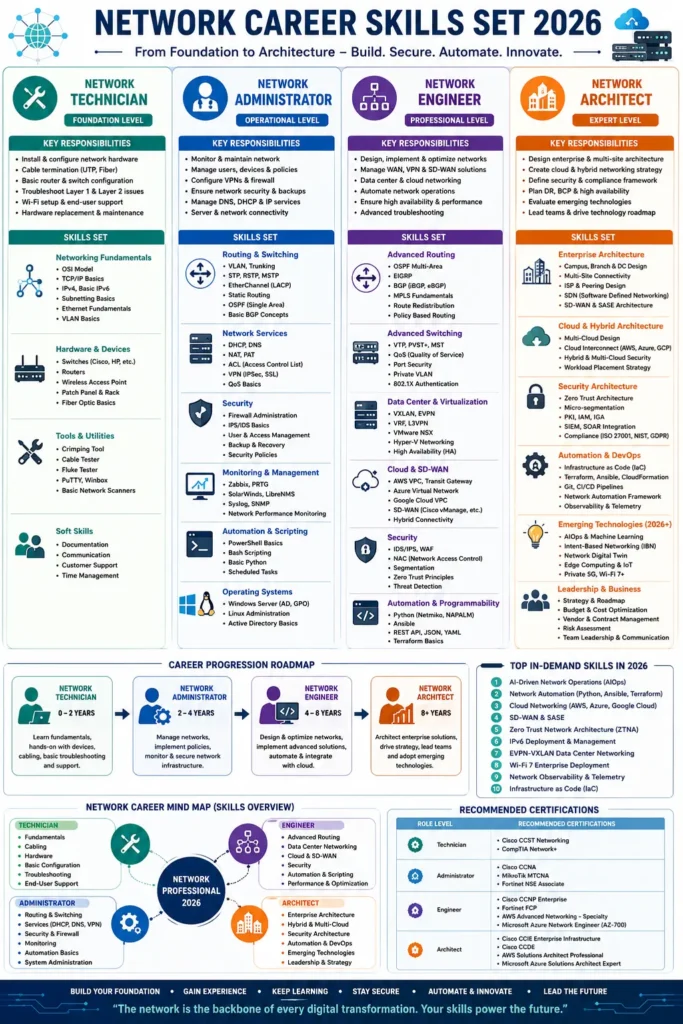
Career Progression Roadmap: How the Path Actually Unfolds
A networking career rarely jumps stages — it compounds. Each level builds directly on the skills and instincts developed in the one before it, which is why rushing past the fundamentals tends to create weak architects later on.
| Stage | Experience | Focus |
| Network Technician | 0–2 Years | Learn the fundamentals through hands-on work with devices, cabling, and basic troubleshooting and support. |
| Network Administrator | 2–4 Years | Take ownership of live networks — manage infrastructure, implement policies, and monitor and secure day-to-day operations. |
| Network Engineer | 4–8 Years | Design and optimize networks, implement advanced solutions, and integrate with cloud platforms. |
| Network Architect | 8+ Years | Architect enterprise-wide solutions, drive technology strategy, lead teams, and adopt emerging technologies. |
Top 10 In-Demand Networking Skills for 2026
- 1. AI-driven network operations (AIOps) — Using machine learning to spot issues and automate responses before outages happen.
- 2. Network automation (Python, Ansible, Terraform) — Managing infrastructure through code instead of manual, device-by-device configuration.
- 3. Cloud networking (AWS, Azure, Google Cloud) — Designing and connecting networking resources across major public cloud platforms.
- 4. SD-WAN and SASE — Delivering unified, cloud-based networking and security across distributed sites.
- 5. Zero Trust Network Architecture (ZTNA) — Verifying every user and device continuously rather than trusting by network location.
- 6. IPv6 deployment and management — Rolling out and operating the next-generation addressing standard at scale.
- 7. EVPN-VXLAN data center networking — Building modern, scalable overlay networks for large data centers.
- 8. Wi-Fi 7 enterprise deployment — Planning and rolling out the latest wireless standard for enterprise use.
- 9. Network observability and telemetry — Gaining real-time, granular visibility into how the network is actually behaving.
- 10. Infrastructure as Code (IaC) — Provisioning and managing network infrastructure through version-controlled code.
The Network Career Mind Map: How the Roles Connect
Rather than four isolated job titles, think of a networking career as a single connected skill tree branching out from a central core of networking competence. Each stage adds a new layer of scope without discarding what came before — an architect still needs to understand cabling fundamentals, just as an administrator still needs to understand automation. Visualizing the four roles this way makes it easier to see which skills to build next, no matter where you currently sit on the ladder.
Recommended Certifications by Role Level
| Role Level | Recommended Certifications |
| Technician | Cisco CCST Networking, CompTIA Network+ |
| Administrator | Cisco CCNA, MikroTik MTCNA, Fortinet NSE Associate |
| Engineer | Cisco CCNP Enterprise, Fortinet FCP, AWS Advanced Networking – Specialty, Microsoft Azure Network Engineer (AZ-700) |
| Architect | Cisco CCIE Enterprise Infrastructure, Cisco CCDE, AWS Solutions Architect Professional, Microsoft Azure Solutions Architect Expert |
How to Choose Where to Focus Right Now
If you’re new to networking, resist the urge to chase advanced certifications before you’ve spent real time with hardware, cabling, and basic troubleshooting — the instincts built here quietly support everything that follows.
If you’re already an administrator, the jump to engineer is less about learning new tools and more about learning to design rather than just operate — start layering in automation and cloud networking alongside your daily operational work.
If you’re aiming for architect-level roles, technical depth alone won’t get you there. Business strategy, budget ownership, and cross-team leadership matter just as much as your grasp of SD-WAN or zero trust design.
Frequently Asked Questions
Q: What is the main difference between a Network Administrator and a Network Engineer?
A: A Network Administrator focuses on operating, monitoring, and securing an existing network day to day, while a Network Engineer focuses on designing, building, and optimizing that network — including advanced routing, data center, and cloud connectivity work.
Q: Do I need to become a Network Administrator before becoming a Network Engineer?
A: Not strictly, but it’s the most common and most reliable path. The operational experience gained as an administrator — troubleshooting real production issues — builds judgment that’s difficult to replicate by studying design theory alone.
Q: How long does it take to become a Network Architect?
A: Most Network Architects have eight or more years of progressively senior networking experience, typically moving through technician, administrator, and engineer roles before taking on enterprise-wide architecture responsibility.
Q: Which certification should a beginner start with in 2026?
A: CompTIA Network+ or Cisco’s CCST Networking are the most common starting points, since both validate foundational networking concepts before moving on to vendor-specific, role-based certifications like CCNA.
Q: Is automation skill necessary at every level?
A: Basic scripting is increasingly expected even at the administrator level, and by the engineer and architect stages, automation and Infrastructure as Code are core expectations rather than optional extras.
Conclusion
Networking careers aren’t defined by a single skill set — they’re defined by an expanding scope of responsibility. A technician keeps hardware running, an administrator keeps a network secure and available, an engineer designs how it should work, and an architect decides where the entire organization’s infrastructure is headed next. Understanding exactly where you are on that ladder — and exactly what separates your current role from the next one — is the clearest way to plan a deliberate, well-paced networking career in 2026 and beyond.
See Also
-

Academic Excellence vs. Industry Certifications vs. Real-World Experience: The Formula for Career Success
-

Network Technician vs Network Administrator vs Network Engineer vs Network Architect: Complete Skills Set, Mind Map & Career Roadmap (2026)
-

Cloud Roles Explained: Architect vs Engineer vs Administrator vs Practitioner in One Complete Guide
-

How to Turn Your Passion for Graphics into a Freelance Career
-

The Future of IT Support and Administration Careers: Trends You Can’t Ignore
-

Top 7 Gig Work Opportunities in the ICT Sector You Can’t Ignore
-

ICT Career Planning in 2025: Trends, Tips, and Game-Changing Insights
-

What are the Top Skills Needed to Transition into a Cloud Architect Role?
-

How is AI Changing the Landscape of IT Careers?