Computer networking hardware is the collection of physical devices — cables, cards, boxes, and appliances — that allow computers and other equipment to exchange data across a network. Software defines the rules of that conversation, but hardware is what actually carries it: through copper wire, glass fiber, or radio signal.
This guide walks through every major category of networking hardware you are likely to encounter, from the cable running behind your desk to the server sitting in a data center. Each entry explains what the device does, how it works at a technical level, where it fits in a real network, and how it compares to its closest relatives — so you come away with more than just a definition.
Networking Cables, Connectors, and Ports
A network cable is the physical wiring that carries data between individual devices and the wider network. The type of cable used affects speed, maximum distance, and resistance to electrical interference, so choosing the right cable is usually the first decision made when building any wired network.
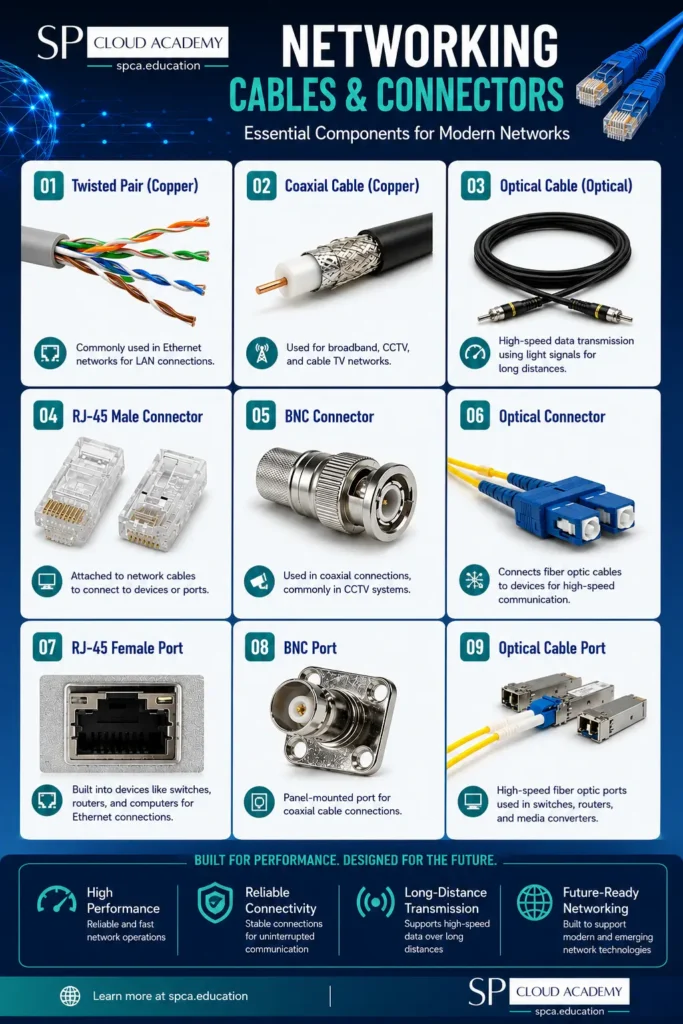
Twisted pair (copper) cable
Twisted pair is the standard Ethernet cable found in homes, offices, and data centers. Inside the jacket, pairs of copper wires are twisted around each other, which cancels out electromagnetic interference between adjacent pairs and keeps the signal clean over distance. Category ratings tell you what the cable can handle: Cat5e supports gigabit speeds over 100 meters, Cat6 supports gigabit speeds more reliably and can reach 10 gigabits over shorter runs, and Cat6a extends 10-gigabit performance to the full 100-meter run with heavier shielding. Shielded variants (STP) add a foil or braided layer for environments with heavy electrical noise, such as near motors or fluorescent lighting, while unshielded twisted pair (UTP) is the norm for standard office and home installs.
Coaxial cable (copper)
Coaxial cable uses a single copper core surrounded by insulation, a metal shield, and an outer jacket. The shielding gives it strong resistance to interference, which historically made it the backbone of cable television and early cable internet delivery. It is largely legacy technology for computer networking today, but it still appears in some cable-modem installations and older CCTV and building-wiring runs that have not been upgraded.
Optical cable (fiber)
Fiber optic cable carries data as pulses of light through a hair-thin strand of glass or plastic rather than electricity through metal. Because light does not degrade or pick up electrical interference the way an electrical signal does, fiber supports dramatically higher speeds over much longer distances — tens of kilometers without a repeater, compared to roughly 100 meters for copper Ethernet. Single-mode fiber uses a narrow core and a laser light source for long-haul runs between buildings or cities; multimode fiber uses a wider core and LED or laser sources for shorter runs within a building or data center, at lower cost.
RJ-45 connectors and ports
RJ-45 is the modular plug and matching port used on virtually every Ethernet cable, NIC, switch, and router. It has eight pins that align with the eight individual copper wires inside a twisted-pair cable, following a standardized wiring pattern (T568A or T568B) so that cables made by different manufacturers remain interchangeable.
BNC connectors and ports
BNC is a twist-lock connector originally paired with coaxial cable. A quarter-turn locks it firmly in place, which made it popular for early Ethernet and remains common today in analog CCTV and video surveillance wiring, as well as some test and lab equipment.
Optical connectors and ports
Fiber connectors, such as SC (a push-pull square connector) and LC (a smaller push-pull connector common in dense equipment racks), are precision-machined so that the glass fiber ends align almost perfectly, minimizing the light loss that would otherwise occur at every joint. Because the tolerances are so tight, fiber connectors typically require specialized termination or pre-terminated patch cables rather than a simple crimp.
Networking Tools and Accessories
Installing and maintaining physical network infrastructure calls for a dedicated toolkit, most of which is unfamiliar to anyone who has not worked directly with structured cabling.
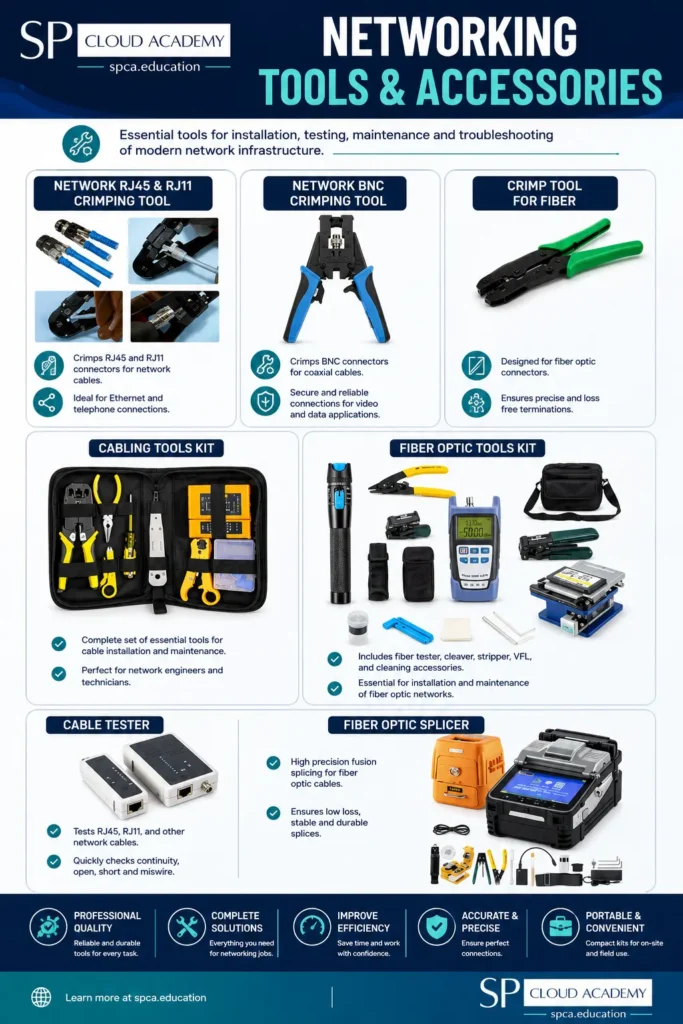
Crimping tools
A crimp tool attaches a connector — typically an RJ-45 plug, but also RJ-11 or BNC heads — to the end of a cable by compressing the connector’s internal pins down onto the exposed copper wires until they bite through the insulation and make contact. A good crimper also usually includes a built-in wire stripper and cutter, since preparing the cable end correctly matters as much as the crimp itself.
Cable testers
A cable tester checks a finished cable run for continuity, correct wire-pair mapping, shorts, and opens before it goes into service. Basic testers give a simple pass/fail per pin; more advanced units can measure cable length, locate the point of a break, and certify that a run meets the performance standard it is rated for.
Fiber splicing and termination tools
Fiber cannot be crimped the way copper can, since the glass core has to be aligned with sub-micron precision. Fiber technicians instead use cleavers to make a clean, perpendicular cut in the glass, fusion splicers to fuse two fiber ends together with heat, and optical power meters or light sources to verify signal strength once the splice or termination is complete.
General cabling tool kits
For technicians who move between copper and fiber jobs, all-in-one kits bundle wire strippers, crimpers, punch-down tools, cable testers, and screwdrivers into a single case, cutting down on the number of separate tools that need to be carried to a job site.
Network Interface Card (NIC)
A network interface card, also called a network adapter or network interface controller, is the component — built into the motherboard or added separately — that gives a device its physical connection to a network. Every computer, laptop, and server needs at least one, whether that connection is a wired Ethernet port, a Wi-Fi radio, or a fiber interface. A NIC handles the low-level work of converting data from the device into signals suitable for the network medium, and back again, including assigning the unique MAC address that identifies the device on its local network segment.
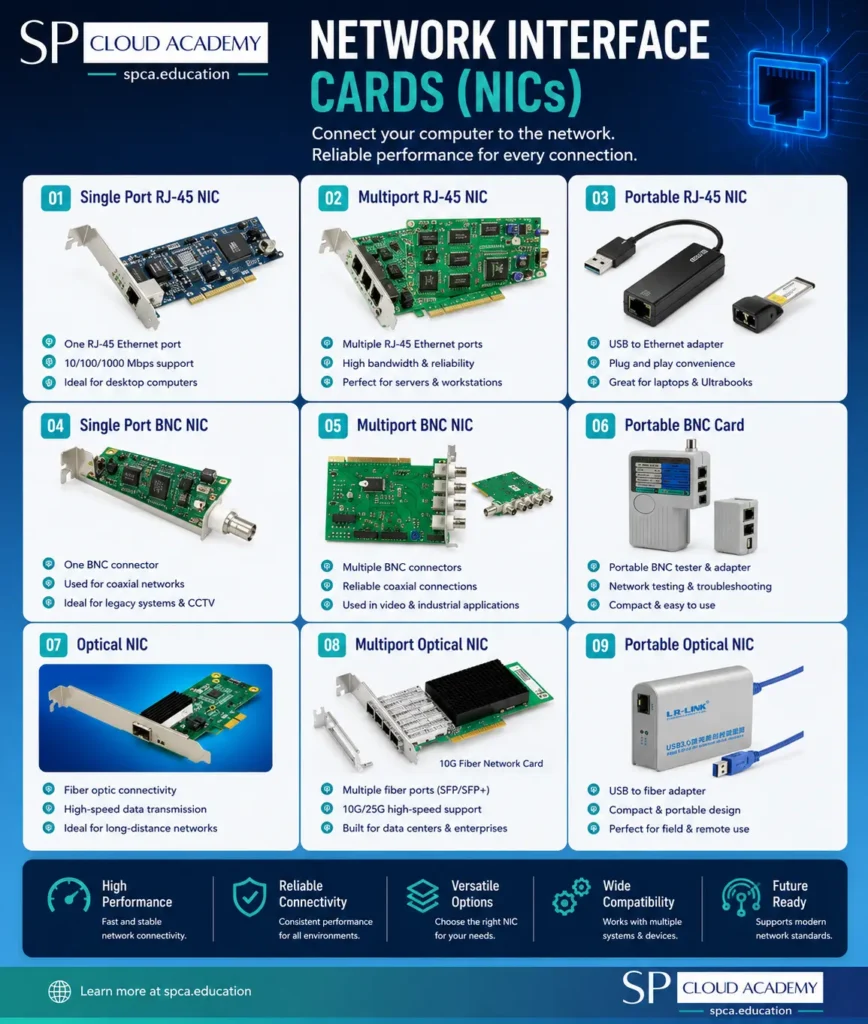
Single-port NIC
The standard configuration for most desktop computers, providing one wired Ethernet or fiber connection. Most modern motherboards include this built in, so an add-in card is only needed if the onboard NIC fails or needs to be upgraded to a faster standard.
Multiport NIC
Servers and workstations that need more networking capacity than a single connection can provide use multiport cards, often with two or four ports. These are typically used for link aggregation (combining multiple physical connections into one higher-bandwidth logical link), redundancy (so a single cable failure does not take the device offline), or separating different types of traffic onto dedicated physical paths.
Portable and USB NICs
Compact USB-to-Ethernet adapters add a wired network port to laptops, tablets, and ultrabooks that ship without one, which has become common as manufacturers slim down device chassis. These are especially useful for a fast, stable connection during firmware updates, large file transfers, or IT diagnostic work where Wi-Fi is not reliable enough.
Combinational NIC
Some cards support more than one media type or standard — for example, combining RJ-45 and fiber interfaces on a single card — which is useful in mixed-infrastructure environments where a device needs the flexibility to connect to either type of network without swapping hardware.
Basic Communication Devices
Modems
A modem (modulator-demodulator) converts the digital signal from your network into a format that can travel over your internet service provider’s physical line, and converts the incoming signal from that line back into digital data your network equipment can use. It is the device that actually establishes and terminates your connection to the ISP, distinct from the router, which then distributes that connection to individual devices.
Cable modem
A cable modem connects over the same coaxial line used for cable television service, using the DOCSIS standard to share bandwidth with TV signals on the same cable. Speeds vary widely by DOCSIS version and the provider’s network congestion, but cable remains one of the most widely available broadband options in residential areas.
ADSL/DSL modem
A DSL modem connects over standard copper telephone lines, splitting the line so that data and voice can travel simultaneously without interfering with each other. DSL speeds are heavily influenced by the physical distance from the telephone exchange, making it a common but often slower option in areas without cable or fiber infrastructure.
4G/LTE and 5G modem routers
These devices combine a cellular modem with routing and Wi-Fi functions in a single unit, using a SIM card to connect to a mobile carrier’s network instead of a fixed line. They are widely used as a primary connection in areas without fixed-line broadband, as a backup connection for business continuity, or for temporary setups such as events and construction sites.
Basic Networking Devices
These are the foundational devices used to connect equipment within a single network, before any routing between separate networks comes into play.
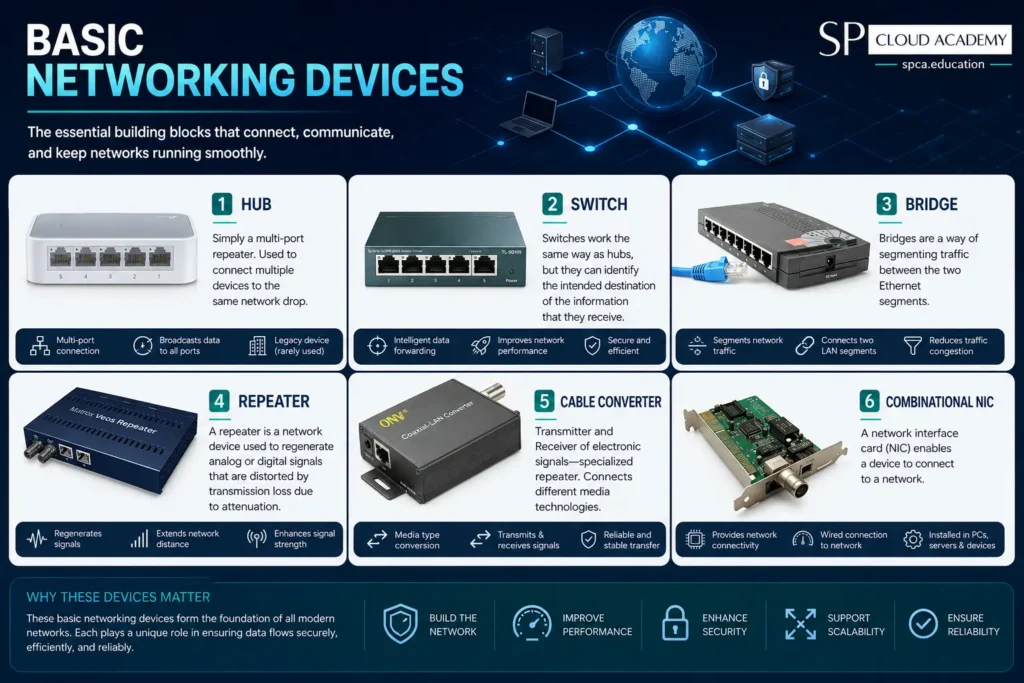
Hub
A hub is essentially a multi-port repeater operating at the physical layer of the OSI model. It has no awareness of MAC addresses, IP addresses, or which device actually needs a given piece of data — it simply repeats every incoming signal out to every other connected port. Because every device on a hub shares the same collision domain, more connected devices means more collisions and steadily worse performance. Hubs have been almost entirely replaced by switches, though they still appear in legacy installations, basic lab exercises, and situations where a technician deliberately wants to see all traffic on a segment for diagnostic purposes.
Switch
A switch connects multiple devices on the same local network but, unlike a hub, does so intelligently. It maintains a MAC address table that maps each connected device to a specific port, learned automatically as traffic passes through. When data arrives for a particular device, the switch forwards it only to that device’s port instead of broadcasting it everywhere, which eliminates unnecessary traffic and largely removes collisions, since each port effectively gets its own dedicated collision domain. This is why switches, rather than hubs, are the standard choice for wired LANs today, from a five-port desktop switch to a rack-mounted unit with 48 or more ports.
Bridge
A bridge joins two Ethernet segments so they function as a single logical network, while still keeping each segment’s local traffic contained to that segment unless it specifically needs to cross over. This segmentation reduces overall collision traffic compared to simply combining both segments onto one shared medium, and bridges are often used to connect a wired segment with a wireless one, or to join two sections of a building without pulling new cable.
Repeater
A repeater regenerates a signal that has weakened over distance due to attenuation — the natural loss of signal strength as it travels through cable or air — restoring it to something close to its original strength so it can continue on toward its destination. Repeaters operate purely at the physical layer and do not interpret or filter the data they are boosting; they simply amplify and retransmit it.
Cable converter
A cable converter is a specialized repeater that also translates between two different physical media, such as taking a signal in on a coaxial connection and putting it back out as standard Ethernet. This lets legacy coaxial wiring interoperate with modern Ethernet-based equipment without having to re-run cable throughout a building.
Routing and Switching Devices
Once a network grows beyond a single segment, it needs devices that can direct traffic intelligently between different parts of the network, or out to entirely separate networks altogether.
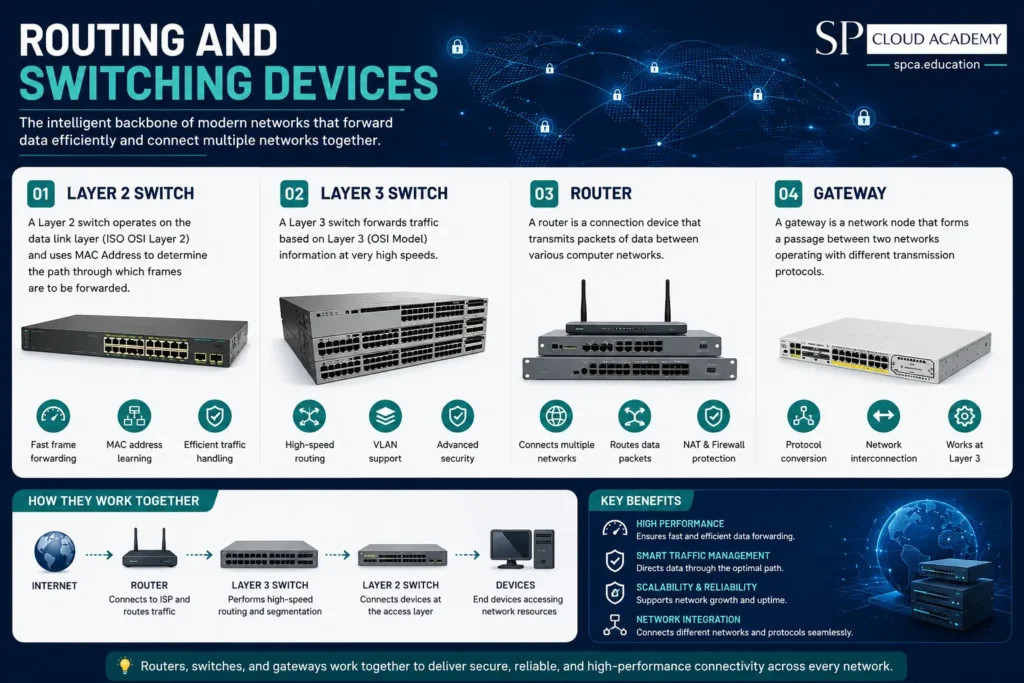
Layer 2 switch
A Layer 2 switch is the standard switch described above, operating at the data link layer of the OSI model and using MAC addresses to decide where each frame of data should be forwarded. It is the default choice for connecting end-user devices — computers, printers, phones, access points — within a single LAN or VLAN.
Layer 3 switch
A Layer 3 switch adds IP-based routing intelligence on top of standard Layer 2 switching, forwarding traffic based on IP address information at very high, hardware-accelerated speed. This makes it well suited to larger networks that need fast routing between multiple internal VLANs — for example, separating a company’s finance, engineering, and guest Wi-Fi traffic — without pushing all of that inter-VLAN traffic through a slower, more general-purpose router.
Router
A router connects separate networks and transmits data packets between them, most commonly linking a local network to the internet. It reads the destination IP address on each packet, consults its routing table, and determines the most efficient path for that packet to take toward its destination. Home and small-office routers typically bundle routing with a basic switch and firewall in one box, while enterprise networks often use a dedicated routing appliance separate from switching and wireless hardware for more granular control and easier scaling.
Gateway
A gateway is a network node that forms a passage between two networks that use different transmission protocols, doing the translation work necessary for them to communicate at all. The most common type, the network gateway, typically operates at Layer 3 or above and marks the point where traffic leaves one type of network environment — a private LAN, for instance — for another, such as the public internet or a partner organization’s network using different addressing or protocol standards. In many small networks, the router doubles as the gateway; in more complex environments, dedicated gateway devices handle protocol translation that a standard router cannot.
| Device | OSI Layer | Decision Basis | Best Use Case |
| Hub | Layer 1 | None — repeats to all ports | Legacy or lab demonstrations only |
| Switch (Layer 2) | Layer 2 | MAC address | Connecting devices within one LAN |
| Layer 3 Switch | Layer 3 | MAC + IP address | High-speed routing inside large LANs/VLANs |
| Router | Layer 3 | IP address | Connecting a LAN to the internet or other networks |
| Gateway | Layer 3+ | Protocol translation | Linking networks that speak different protocols |
Wireless Networking Devices
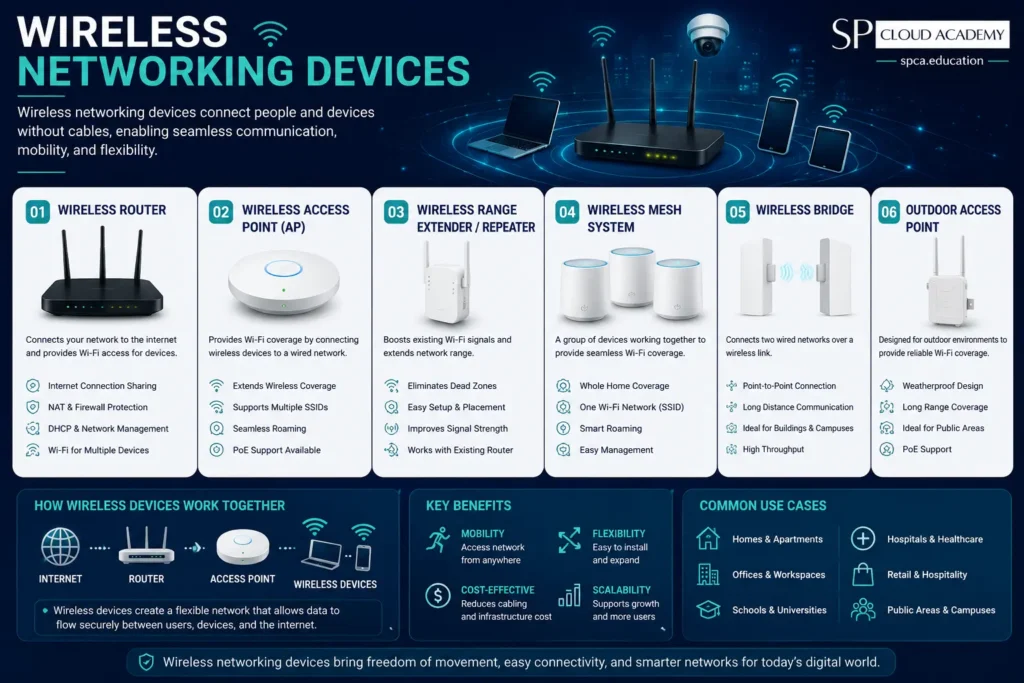
The Wireless devices extend network access to equipment that is not physically wired in, using radio signals in place of cable.
Wireless switch
A wireless switch pairs standard switch functionality with built-in wireless radios, or acts as a controller managing multiple access points from one central point. In larger deployments, centralizing control this way makes it far easier to apply consistent Wi-Fi settings, security policies, and channel planning across many access points at once.
Access point
An access point broadcasts a Wi-Fi signal that connects wireless devices back to the wired network, typically through a switch or router. In homes, a single access point (often built into the router) is usually enough. In larger buildings, multiple access points are placed strategically throughout the space, often on the same wired backbone and coordinated to hand devices off smoothly from one to the next, providing consistent coverage that a single unit could not achieve across multiple floors or thick walls.
Wireless SOHO router
A small office/home office router combines routing, switching, and wireless access point functions into a single consumer-friendly device. This all-in-one approach trades some of the flexibility and scalability of separate components for simplicity and lower cost, which is exactly the right tradeoff for most homes and very small offices.
Network Security Devices
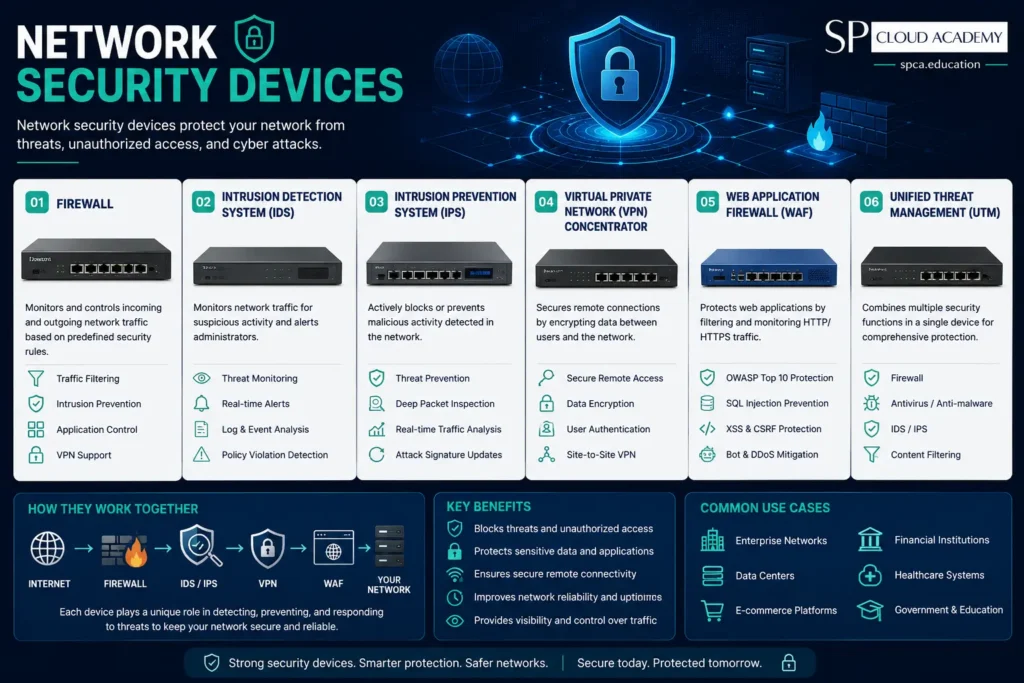
Firewall
A firewall is a network security device — implemented in hardware, software, or both — that monitors all incoming and outgoing traffic and applies a defined set of rules to accept, reject, or drop that traffic. A dedicated hardware firewall appliance protects an entire network at its perimeter, inspecting traffic before it ever reaches internal devices, which is standard practice in business environments and increasingly common in security-conscious home setups as well. More advanced next-generation firewalls add deep packet inspection, intrusion detection, and application-level filtering on top of basic rule-based blocking.
Signal jammer
A signal jammer transmits on the same frequency range as a cellphone or other wireless device, creating interference strong enough to block signal transmission within a given area. Because jammers can disrupt legitimate communications, including emergency calls, their sale, possession, and use is tightly restricted or outright illegal for private individuals in many countries, including the United States. This entry is included for awareness of the broader networking-hardware landscape, not as a product recommendation.
Networking Computing Devices
Workstation
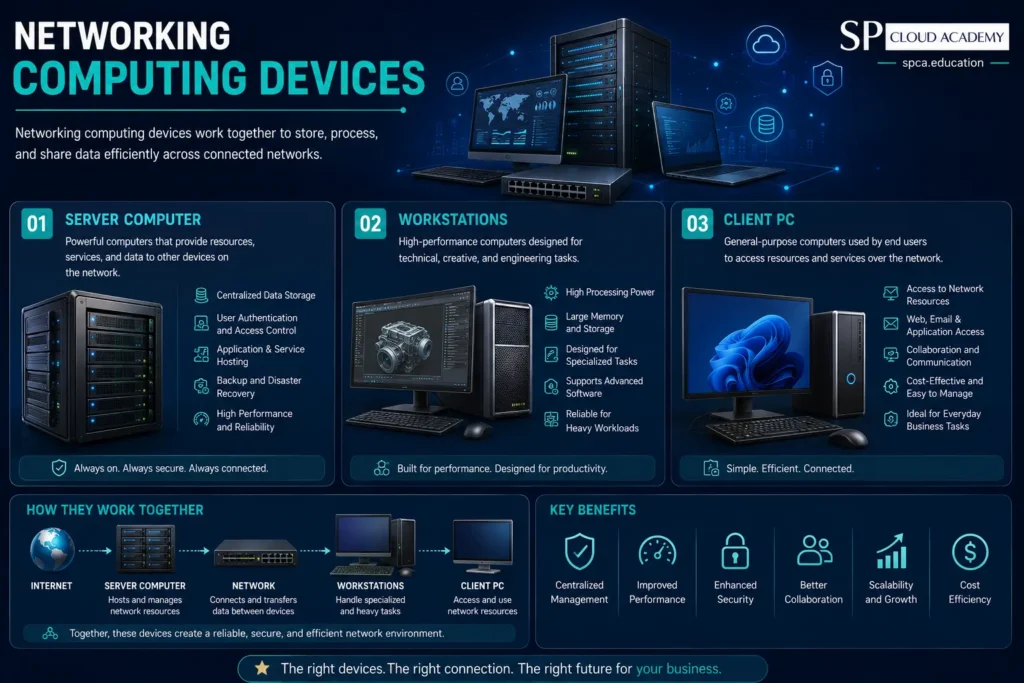
A workstation is a computer intended for individual use that is faster and more capable than a standard personal computer, typically built around a higher-end processor, more memory, and sometimes a professional-grade graphics card. Workstations are common in roles such as engineering, video and 3D design, scientific computing, and data analysis, where the extra processing headroom noticeably speeds up daily work.
Server
A network server is a powerful computer that acts as a central repository for data and a variety of programs shared across the network, serving requests from many client devices at once. Unlike a typical workstation, servers are built primarily for reliability, uptime, and continuous operation — often featuring redundant power supplies, hot-swappable drives, and error-correcting memory — since they may run uninterrupted for months or years supporting everything from file storage to email to internal business applications.
How These Devices Work Together
In a typical small office, the pieces described above form a single chain: a modem terminates the ISP connection, a router directs traffic in and out of the local network, a Layer 2 or Layer 3 switch connects wired devices, one or more access points extend coverage to wireless devices, a firewall inspects traffic at the perimeter, and workstations or servers sit at the endpoints actually using the data. Cabling, connectors, and the tools used to install them tie every physical link together, while a NIC in each device provides its individual point of entry onto the network.
Frequently Asked Questions
What is the difference between a hub, a switch, and a router?
A hub repeats data to every connected port with no awareness of the destination device. A switch reads MAC addresses and sends data only to the intended device on the same network, using a dynamically learned address table. A router goes a step further, directing traffic between entirely separate networks using IP addresses — most commonly connecting a LAN to the internet.
Do I need a Layer 3 switch instead of a router?
Layer 3 switches are designed for fast, hardware-accelerated routing between segments inside a large internal network, such as separate VLANs in an office. A router is still typically needed to connect that internal network out to the internet or to another external network, since Layer 3 switches are generally optimized for internal routing rather than internet-facing functions like NAT.
Why does fiber optic cable matter for a network that mostly uses Ethernet?
Fiber is commonly used for the connection coming into a building from an ISP, or for long backbone runs between switches in a larger facility, because it supports much greater distances and speeds than copper with far less susceptibility to electrical interference. Standard Ethernet cabling still handles the shorter connections out to individual devices, where fiber’s extra cost and handling requirements are not worth the tradeoff.
Is a hardware firewall necessary for a small business?
Many routers include basic firewall functionality, which may be enough for very small setups with minimal sensitive data. Businesses handling sensitive customer or financial data, or with more complex traffic patterns, generally benefit from a dedicated hardware firewall appliance, which offers stronger, more configurable protection and often deeper visibility into what is actually crossing the network perimeter.
What is the role of a network interface card if my laptop already has Wi-Fi?
The Wi-Fi adapter inside your laptop is itself a type of NIC. A separate wired or portable USB NIC becomes useful when you need a faster or more stable connection than Wi-Fi can reliably provide, or when connecting older equipment and peripherals that lack a built-in network adapter of their own.
What is the difference between single-mode and multimode fiber?
Single-mode fiber uses a very narrow core and a laser light source, allowing it to carry a signal over tens of kilometers with minimal loss, which makes it the standard for long-distance and carrier-grade links. Multimode fiber uses a wider core and typically an LED or lower-cost laser source, making it cheaper to deploy but limited to shorter distances, which is why it is more common for connections within a single building or data center.
See Also
-
Routers in 2026
-
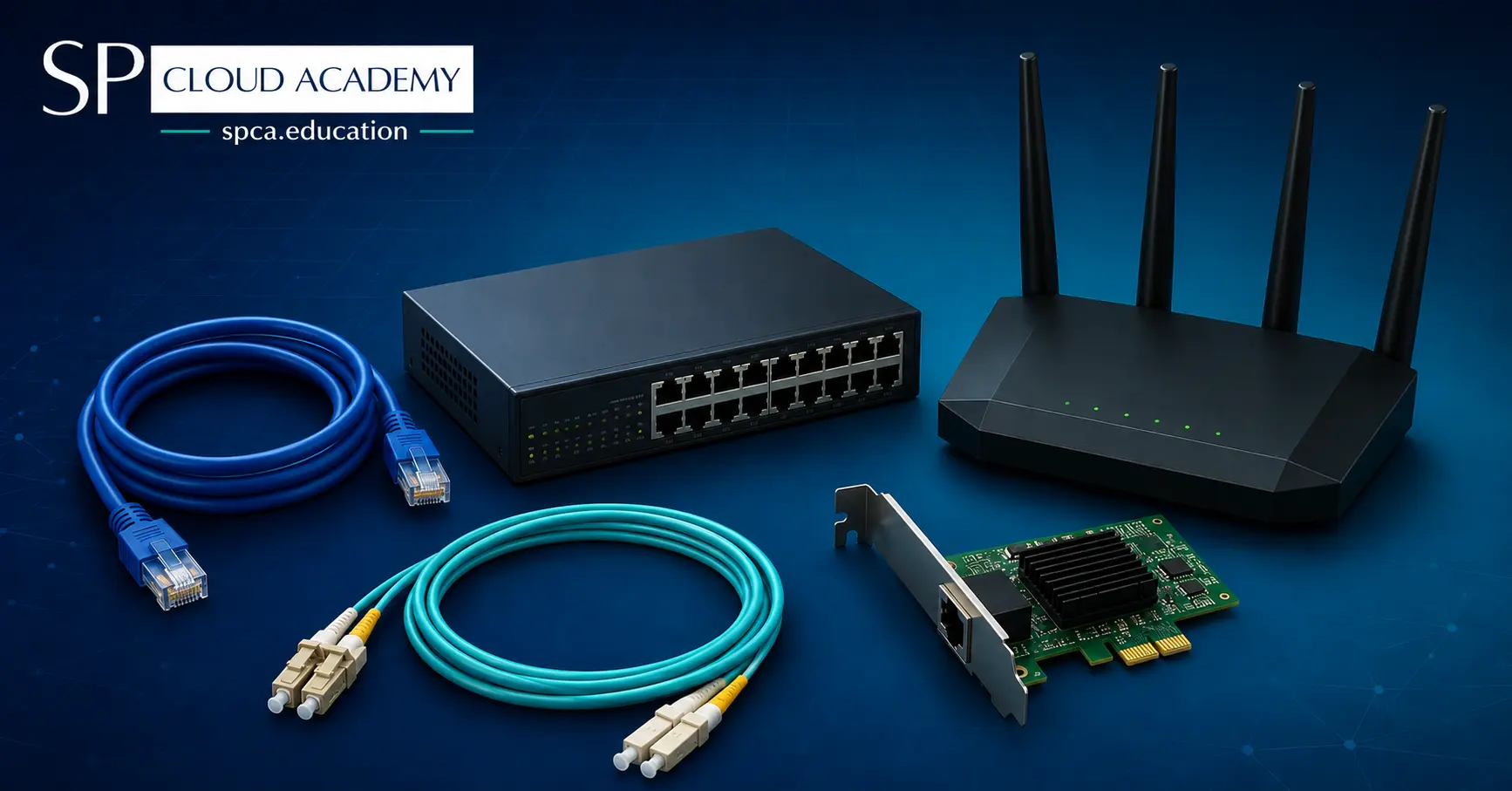
Computer Networking Hardware: The Complete 2026 Guide to Every Device, Cable, and Connector
-
SDN Architecture Explained: Complete Beginner-to-Expert Guide (2026)
-

Networking Architecture Decoded: Choosing Between Peer-to-Peer, Client-Server, and Domain-Based Networks
-

AI-Driven Networking Explained: The Smartest Upgrade Your IT Infrastructure Can Make
-
WiFi 7 Explained: The Next-Generation Wireless Technology for Ultra-Fast Speed and Low Latency
-

Why Software-Defined Networking Is the Future (And What That Means for You)
-

From Chaos to Control: How MikroTik Bandwidth Manager Transforms Network Management
-

The Ultimate Buyer’s Guide to the Best SOHO Routers in 2025