Ten years ago, a school’s IT department could get by with a single server room, a handful of desktops, and a firewall nobody thought too hard about. That world is gone. Today’s educational institutions run learning management systems, video conferencing platforms, research computing clusters, student information systems, and remote-access labs — often all at once, and often for thousands of students who expect everything to simply work, from any device, anywhere. Meeting that expectation without blowing the budget or the security model is exactly why multi-cloud and hybrid IT infrastructure has become the default architecture pattern for forward-looking schools, colleges, and universities.
This guide walks through what a modern multi-cloud and hybrid IT infrastructure for educational institutions actually looks like, why the model has become so popular in the education sector, and how architects and IT leaders can approach the design process step by step.
What Is Multi-Cloud and Hybrid IT Infrastructure, Exactly?
The two terms get used interchangeably, but they describe different design decisions. A hybrid IT infrastructure combines on-premises systems — think a physical domain controller, local file servers, or a data center inside a campus building — with public cloud services. A multi-cloud infrastructure, on the other hand, means an institution deliberately uses more than one public cloud provider, such as Microsoft Azure alongside Google Cloud, AWS, or a VMware-based private cloud, rather than locking into a single vendor.
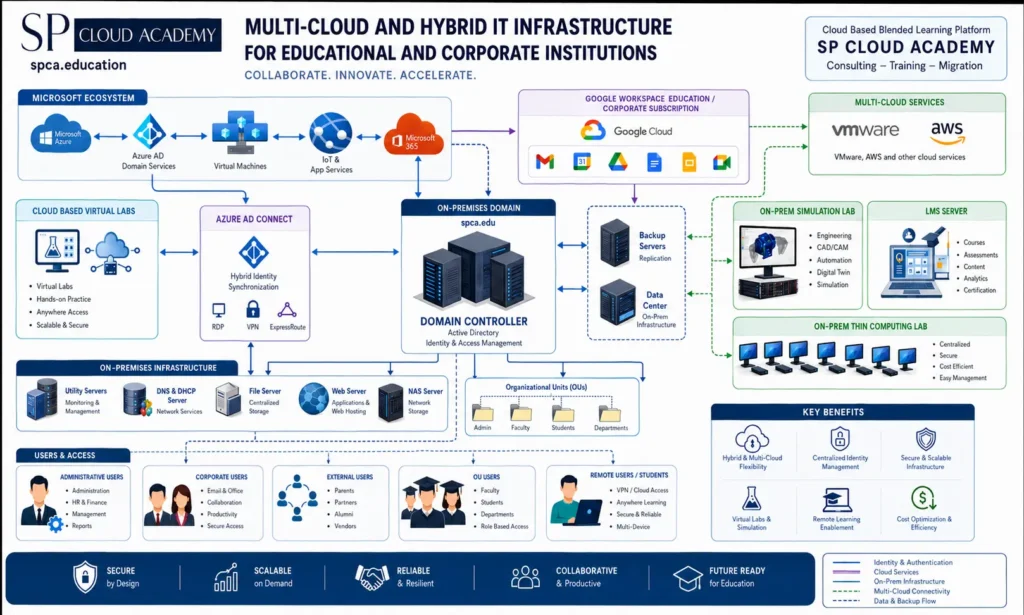
In practice, most modern education networks are both hybrid and multi-cloud at the same time. A university might keep its Active Directory domain controller on-premises for tight control over identity and access, sync that identity to Azure AD for Microsoft 365 and virtual machines, extend Google Workspace for education-wide collaboration, and spin up AWS or VMware capacity for research workloads or disaster recovery. Each piece is chosen for what it does best, and the architecture stitches them together into a single, coherent experience for students, faculty, and staff.
Why Educational Institutions Are Moving Toward This Model
A few forces are pushing schools and universities toward hybrid, multi-cloud designs rather than a single monolithic system.
1. Diverse and Distributed User Populations
A single campus network now has to serve administrative staff, full-time faculty, corporate or continuing-education partners, remote and hybrid students, alumni, and external stakeholders like parents or vendors. Each group needs a different level of access, a different device profile, and often a different location of connection. Hybrid infrastructure lets institutions apply role-based access policies centrally, while multi-cloud lets them route each group to the service best suited to them — Google Workspace for lightweight collaboration, Azure for managed virtual desktops, and on-premises systems for anything requiring strict data residency.
2. The Rise of Virtual Labs, Simulation, and Remote Learning
Engineering, computer-aided design, digital twin modeling, and cybersecurity training all demand serious compute power that most classrooms can’t host locally. Cloud-based virtual labs solve this by letting students access lab-grade workstations from a browser, while on-premises simulation labs still handle latency-sensitive or specialized hardware-bound work. This split — heavy simulation on-prem, flexible access in the cloud — is a textbook hybrid pattern.
3. Budget Pressure and the Need for Cost Optimization
Public institutions in particular operate under constant budget scrutiny. Multi-cloud lets IT leaders match workloads to the most cost-effective provider instead of over-paying a single vendor for services it isn’t strongest at, while on-premises infrastructure remains the more economical choice for steady, predictable workloads like file storage or a learning management system with a stable user base.
4. Resilience, Backup, and Business Continuity
Losing access to a student information system or an LMS during exam week is not a minor inconvenience — it is a crisis. Hybrid architecture supports layered backup and replication: on-premises backup servers protect against local hardware failure, while cloud-based replication protects against a building-level disaster. Multi-cloud goes a step further, ensuring that even a full outage at one provider doesn’t take down every system at once.
| Quick Takeaway Hybrid = on-premises systems + public cloud, working together. Multi-cloud = using more than one public cloud provider by design, not by accident. Together, they let an institution match each workload — identity, collaboration, labs, backup — to the platform that handles it best. |
Core Components of a Modern Educational IT Architecture
A well-designed hybrid, multi-cloud environment for education is built from several interlocking layers. Understanding each one — and how it connects to the others — is the foundation of good architecture.
Identity and Access as the Central Nervous System
Everything in a hybrid environment ultimately depends on identity. Most institutions still run an on-premises domain controller with Active Directory for identity and access management, then synchronize that identity to the cloud through a directory synchronization tool. This gives staff and students a single set of credentials that works across on-premises file servers, Microsoft 365, Google Workspace, VPN access, and cloud virtual machines. Getting this synchronization layer right — including secure remote access through VPN, RDP, or a dedicated private network connection — is arguably the single highest-leverage decision in the entire design, because every other system inherits its security posture from it.
The Microsoft and Google Ecosystems, Working Side by Side
Most campuses end up running both a Microsoft ecosystem — Azure Active Directory Domain Services, virtual machines, IoT and application services, Microsoft 365 — and a Google Workspace for Education or corporate subscription for email, shared drives, documents, and video conferencing. Rather than treating this as duplication, well-architected environments treat it as intentional redundancy and flexibility: staff get enterprise-grade productivity tools from Microsoft while broader collaboration, especially with students, happens through Google’s lighter-weight, browser-first tools.
Multi-Cloud Services for Specialized Workloads
Beyond the two productivity ecosystems, institutions increasingly tap into VMware, AWS, and other cloud services for workloads that need elastic scale — research computing, seasonal enrollment spikes, or large-scale data analytics. Keeping these workloads cloud-agnostic where possible protects the institution from being locked into pricing or roadmap decisions made by a single vendor.
On-Premises Infrastructure That Still Matters
Despite the cloud-first instinct many organizations have today, on-premises infrastructure remains essential in education. Utility servers, DNS and DHCP services, centralized file servers, web servers for internal applications, and network-attached storage all continue to run locally in most campus environments, both for cost reasons and because some workloads — high-frequency lab access, for instance — perform far better with low local network latency than they would over the public internet.
Learning Management Systems and On-Premises Simulation Labs
The learning management system is the academic heartbeat of the institution — courses, assessments, content, analytics, and certification all flow through it, and it typically sits close to identity infrastructure so that enrollment and access stay tightly synchronized. Alongside it, on-premises simulation labs support engineering, computer-aided design, automation, digital twin, and other simulation-heavy coursework that benefits from dedicated local hardware.
Thin Computing Labs for Centralized, Cost-Efficient Access
Thin-client computing labs — where lightweight terminals connect back to centralized, secure servers — remain one of the most cost-efficient ways to give large numbers of students consistent access to software and computing power, while keeping management, patching, and security centralized in one place rather than scattered across hundreds of individual machines.
Backup, Replication, and the Data Center
A resilient architecture pairs its production systems with dedicated backup servers for replication and a data center layer for core on-premises infrastructure, connected in both directions to the domain controller and the broader multi-cloud environment. This is what allows an institution to recover quickly — not just from hardware failure, but from ransomware, human error, or a full site outage.
Designing Around Real User Groups, Not Just Systems
One of the most common mistakes in infrastructure design is starting with the technology stack instead of the people who use it. A stronger approach starts by mapping every distinct user population an institution serves, because each group has a different risk profile and a different access pattern.
- Administrative and management staff — Full administrative visibility into HR, finance, and management systems, generally on tightly controlled, wired or managed devices.
- Corporate and office staff — Access to email, collaboration tools, and productivity suites, with secure but slightly more flexible access than core administration.
- Faculty, students, and departmental users — Role-based access scoped by department — admin, faculty, students — through organizational units that keep permissions clean and auditable as people move between roles.
- External users — Limited, carefully scoped access for parents, partners, alumni, and vendors, almost always through self-service portals rather than direct network access.
- Remote users and distance students — VPN or cloud-based access designed for anywhere, any-device learning, with an emphasis on secure, reliable connections over unmanaged home networks.
Once these groups are mapped, the organizational unit structure in Active Directory — separating admin, faculty, students, and departments — becomes the natural mechanism for applying different security policies, software access, and monitoring rules to each group without building separate infrastructure for every single one.
Security, Compliance, and Data Sovereignty
Educational institutions handle some of the most sensitive personal data that exists outside of healthcare — records belonging to minors, financial aid information, health records, and increasingly, biometric or behavioral data from proctoring and analytics tools. A hybrid, multi-cloud architecture actually helps here, because it lets an institution keep its most sensitive data on-premises or in a specific regional cloud region, while still taking advantage of the cloud for everything that doesn’t carry the same regulatory weight.
Centralized identity management, covered earlier, is the backbone of this security posture. On top of it, institutions typically layer role-based access control, encrypted VPN and site-to-site connections between on-premises infrastructure and the cloud, regular patching cycles for both local and cloud-hosted systems, and continuous monitoring across every environment rather than just the on-premises network. Multi-factor authentication, once optional, is now close to a baseline expectation for any account that can reach student records or financial systems.
Cost Optimization Without Sacrificing Capability
Cloud spending can run away quickly if nobody owns the budget conversation. The institutions that get the most value from hybrid, multi-cloud infrastructure treat cost as a design input from day one, not an afterthought discovered on next month’s invoice.
- Keep steady, predictable workloads — core file storage, the primary LMS, everyday productivity — on infrastructure with fixed, known costs, whether that’s on-premises hardware or reserved cloud capacity.
- Reserve elastic, pay-as-you-go cloud services for workloads that spike, like enrollment periods, exam weeks, or seasonal research computing demand.
- Consolidate identity and management tooling so IT staff aren’t paying for, and maintaining, three different systems that do roughly the same job.
- Review usage regularly, since cloud environments tend to accumulate unused virtual machines, storage, and licenses far faster than on-premises hardware ever did.
A Step-by-Step Framework for Designing Your Own Infrastructure
For IT leaders and architects starting this process, it helps to work through the design in a deliberate sequence rather than trying to solve everything simultaneously.
- Step 1: Map your users and their access needs — Catalog every distinct user group, their devices, their locations, and the level of access each genuinely needs — no more, no less.
- Step 2: Establish your identity foundation — Decide where identity will live — typically on-premises Active Directory synchronized to the cloud — since this decision shapes every system built afterward.
- Step 3: Classify workloads by sensitivity and performance need — For every major workload — email, LMS, file storage, simulation labs, backup — decide deliberately whether it belongs on-premises, in a specific cloud, or split across both, based on cost, latency, and compliance needs.
- Step 4: Design the connective tissue — Build the network layer connecting on-premises infrastructure to each cloud environment, with VPN, ExpressRoute, or equivalent dedicated connections, and make sure organizational units and access policies are consistent across every platform.
- Step 5: Build in resilience from the start — Layer on-premises backup, cloud-based replication, and a documented, tested disaster recovery plan — untested backups are, in practice, no backup at all.
- Step 6: Pilot, monitor, and iterate — Roll out access to one user group or one workload at a time, monitor usage and cost closely, and adjust before scaling to the full institution.
Common Pitfalls to Avoid
A few mistakes show up repeatedly in educational IT projects, and most of them are avoidable with a bit of foresight.
- Treating identity synchronization as a one-time setup task instead of an ongoing process that needs monitoring and maintenance.
- Letting shadow IT — departments quietly signing up for their own cloud tools — bypass the central identity and security model entirely.
- Underestimating bandwidth needs for remote labs and simulation tools, which are far more sensitive to latency than typical office applications.
- Designing security policy around the technology stack instead of around the actual risk each user group represents.
- Skipping disaster recovery testing until after an actual incident forces the issue.
Where This Is All Heading
The next phase of educational infrastructure is already visible in early deployments: AI-assisted IT operations that predict capacity needs before enrollment spikes hit, zero-trust security models that verify every request regardless of network location, and edge computing that brings compute power closer to campus buildings for latency-sensitive simulation and lab work. None of this replaces the hybrid, multi-cloud foundation described above — it builds on top of it. Institutions that get the fundamentals right now — solid identity management, clear workload placement, and real backup discipline — will be the ones positioned to adopt these next-generation capabilities without having to rebuild their infrastructure from scratch.
Bringing It All Together
Designing a modern multi-cloud and hybrid IT infrastructure for an educational institution is less about chasing the newest technology and more about making deliberate, well-sequenced decisions: where identity lives, which workloads belong where, how users are grouped, and how the whole system recovers when something inevitably goes wrong. Done well, this architecture gives students and faculty something that feels almost invisible — access that simply works, wherever they are, on whatever device they’re holding — while giving IT leadership the security, cost control, and resilience the institution actually needs behind the scenes.
| Ready to Modernize Your Campus IT Infrastructure? Whether you’re planning a first move to hybrid cloud or optimizing an existing multi-cloud environment, the right architecture decisions made early save years of rework later. Talk to a cloud and systems architecture specialist about mapping your institution’s identity, workloads, and resilience plan before your next budget cycle. |
See Also
-

Personal Data Center and IT Environment: A Complete Guide to Building a Hybrid Cloud Ecosystem
-
Data Center Models, Deployment, and Career: The Complete 2026 Guide
-

Multi-Cloud and Hybrid IT Infrastructure: A Modern Digital Ecosystem for Education and Enterprise
-

How to Use Cloud Computing for Instant High-Performance Computing
-
Personal IT Environment Development for R&D: A Complete Framework for On-Premises, Virtual, and Cloud Labs
-

Computer Lab Management: The Ultimate Guide to Performance, Security & Efficiency
-
Designing a Modern Multi-Cloud and Hybrid IT Infrastructure for Educational Institutions
-

Enterprise Computer Lab Setup: Windows Server, Virtual Machines, and Cloud Integration
-

The Power Trio: Why Cloud, IoT, and Edge Computing Are Driving the Next Digital Revolution