Digital transformation has moved from a competitive advantage to a baseline requirement. Educational institutions and enterprises alike now need an IT ecosystem that is secure, scalable, and intelligent enough to support hybrid work, online learning, and a growing footprint of cloud-native applications.
A Multi-Cloud and Hybrid IT Infrastructure meets this need by combining the flexibility of public cloud platforms with the control and security of on-premises systems. As shown in the architecture below, organizations can bring Microsoft Azure, Microsoft 365, Google Workspace, VMware, AWS, and local data center resources together into a single, unified digital platform — one that modernizes operations without sacrificing availability, security, or long-term scalability.
What Is a Multi-Cloud and Hybrid IT Infrastructure?
A Multi-Cloud and Hybrid IT Infrastructure is an enterprise architecture that blends public cloud services, private cloud infrastructure, on-premises servers, virtualization platforms, cloud productivity suites, secure networking, and centralized identity management into one cohesive system.
Rather than depending on a single cloud provider, organizations draw on the strengths of several platforms at once while keeping their most critical workloads inside their own data centers. The outcome is a digital ecosystem that is resilient, flexible, and cost-effective — built to grow with the institution rather than constrain it.
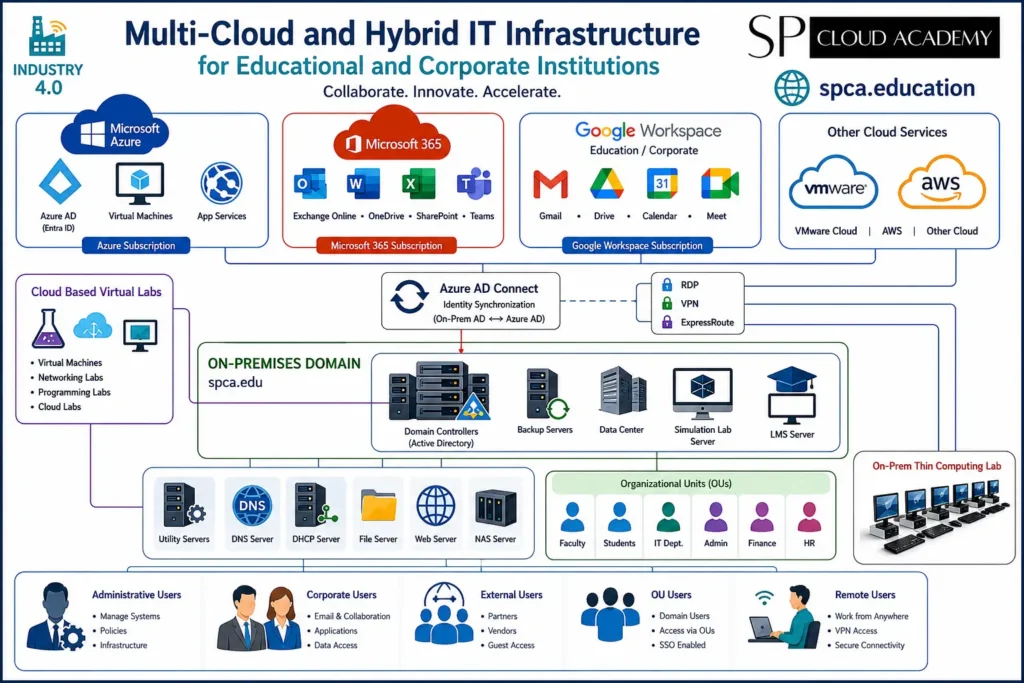
Architecture Overview
The architecture is organized into five interconnected layers, each responsible for a distinct part of reliable, secure service delivery:
- Cloud Services
- Identity and Connectivity
- On-Premises Infrastructure
- Digital Learning and Research Services
- End Users
Cloud Services Layer
Microsoft Azure
Microsoft Azure functions as the primary Infrastructure-as-a-Service (IaaS) platform, providing virtual machines, Azure App Services, Microsoft Entra ID (formerly Azure Active Directory), cloud networking, backup and disaster recovery, and AI and analytics services. Azure lets institutions scale computing resources on demand instead of committing to heavy up-front investment in physical infrastructure.
Its core benefits are high availability, elastic scalability, enterprise-grade security, and access to global cloud infrastructure.
Microsoft 365
Microsoft 365 supplies the productivity and collaboration layer, anchored by Microsoft Teams, Exchange Online, SharePoint Online, OneDrive, and the Office applications. Together, these tools let employees, instructors, and students collaborate securely from any location.
Google Workspace
Google Workspace complements the Microsoft stack with Gmail, Google Drive, Google Meet, and Google Calendar. Educational institutions in particular rely on Workspace to support collaborative learning, cloud storage, and virtual classrooms alongside their Microsoft 365 environment.
VMware and AWS Integration
VMware and AWS extend the architecture further, adding virtualized infrastructure, cloud migration pathways, disaster recovery, and multi-cloud workload distribution. Their inclusion avoids vendor lock-in and gives IT teams more flexibility in how and where workloads are deployed.
Identity and Connectivity Layer
Centralized identity management is the component that ties every other layer together.
Microsoft Entra ID Synchronization
Microsoft Entra Connect Sync (formerly Azure AD Connect) synchronizes the on-premises Active Directory with Microsoft Entra ID, enabling Single Sign-On (SSO), password synchronization, unified identity, and hybrid authentication. Users authenticate once and gain secure access to both cloud and local resources.
Secure Connectivity
Encrypted, reliable connections between users, campuses, and cloud services are maintained through VPN, Remote Desktop Protocol (RDP), and Azure ExpressRoute.
On-Premises Infrastructure
Cloud services are essential, but on-premises infrastructure remains critical for most organizations. The architecture includes domain controllers, a data center, backup servers, a file server, DNS and DHCP servers, a web server, NAS storage, and supporting utility servers — together delivering centralized management and local service availability.
Active Directory Domain Services
The domain controller remains the backbone of enterprise identity, handling user authentication, Group Policy management, organizational units (OUs), security policies, and computer management. This creates a structured, secure IT environment for the entire institution.
Organizational Units (OUs)
Organizational Units simplify administration by grouping users logically — Faculty, Students, IT Department, Administration, Finance, and Human Resources, for example. This structure enables delegated administration, department-specific security policies, and simpler day-to-day management.
Backup and Disaster Recovery
Dedicated backup servers provide data replication, automated backups, recovery management, and disaster preparedness. For modern deployments, cloud backup should complement on-premises backup to follow the industry-standard 3-2-1 backup strategy.
Digital Learning and Research Services
Cloud-Based Virtual Labs
The Cloud Virtual Lab environment is one of the most valuable components of this architecture. It gives students access to networking labs, cloud computing labs, cybersecurity environments, programming platforms, Linux servers, and Windows virtual machines — enabling practical, hands-on learning without the cost of dedicated physical hardware.
Learning Management System (LMS)
The integrated LMS server supports course management, online assessments, assignment submissions, student progress tracking, and learning analytics. Common platforms in this role include Moodle, Canvas, Blackboard, and Open edX.
Simulation Lab Server
The Simulation Lab Server allows students and researchers to run advanced experiments in a virtual environment, including networking simulations, cloud architecture design, engineering software, AI experimentation, and digital twin environments.
User Access Layer
The infrastructure is designed to serve several distinct user groups: administrative users who manage IT systems and security; corporate users who rely on productivity and collaboration tools; students and faculty who use learning platforms and virtual labs; external users such as partners and vendors who receive controlled access; and remote users who connect securely from anywhere via VPN.
Security Features
A modern hybrid cloud architecture has to treat cybersecurity as a first-class concern. Recommended measures include Multi-Factor Authentication (MFA), Conditional Access, Microsoft Defender XDR, Microsoft Sentinel SIEM, Endpoint Detection and Response (EDR), Zero Trust security, network segmentation, and data encryption — together protecting identities, devices, applications, and sensitive information across the environment.
Advantages of a Multi-Cloud Hybrid Infrastructure
Scalability
Cloud resources expand instantly as demand increases, without waiting on new hardware procurement.
High Availability
Critical applications stay operational even during hardware failures.
Business Continuity
Integrated backup and disaster recovery keep downtime to a minimum.
Flexibility
Different cloud providers can be matched to specialized workloads rather than forcing everything onto one platform.
Cost Optimization
Organizations pay only for the cloud resources they consume, while retaining the on-premises systems that make sense to keep in-house.
Enhanced Security
Centralized identity and modern security tooling reduce overall cyber risk.
Improved Learning Experience
Students gain anytime, anywhere access to cloud-based learning resources.
Best Practices for 2026
To future-proof this architecture, organizations should plan around:
- Microsoft Entra ID and Microsoft Intune
- Microsoft Defender XDR and Microsoft Sentinel
- Azure Backup and Azure Site Recovery
- Azure Kubernetes Service (AKS)
- Infrastructure as Code (Terraform / Bicep)
- AI-powered learning assistants and Azure OpenAI integration
- Microsoft Copilot
- Zero Trust Architecture
- Continuous monitoring with Azure Monitor and Log Analytics
Ideal Use Cases
This architecture is well suited to universities, colleges, and technical institutes; research laboratories; corporate training centers; government organizations; healthcare institutions; large enterprises; and smart campuses building out digital learning ecosystems.
Conclusion
A Multi-Cloud and Hybrid IT Infrastructure is the foundation of modern digital transformation. By bringing Microsoft Azure, Microsoft 365, Google Workspace, VMware, AWS, and on-premises resources together, organizations can build a secure, scalable, and resilient platform for collaboration, innovation, and continuous learning.
For educational institutions, this architecture unlocks cloud-based virtual labs, learning management systems, remote access, and centralized identity management. For enterprises, it delivers business continuity, operational efficiency, and the flexibility to adopt emerging technologies such as AI, automation, and cloud-native applications.
Investing in a well-designed hybrid multi-cloud environment today ensures institutions are ready for the demands of 2026 and beyond.
Frequently Asked Questions (FAQ)
What is a Multi-Cloud and Hybrid IT Infrastructure?
It is an IT architecture that combines multiple public cloud providers with on-premises infrastructure to improve flexibility, security, scalability, and reliability.
Why is hybrid cloud important for educational institutions?
It enables secure remote learning, virtual laboratories, centralized identity management, scalable digital services, and efficient resource use — all while preserving critical on-premises systems.
What are the benefits of integrating Microsoft Azure and Google Workspace?
Institutions gain Azure’s enterprise identity and infrastructure services alongside Google Workspace’s collaboration and education tools, creating a flexible, productive environment for both staff and students.
How does Microsoft Entra ID improve security?
It provides centralized identity management, Single Sign-On (SSO), Multi-Factor Authentication (MFA), and Conditional Access policies that strengthen authentication and reduce security risk.
Which organizations benefit most from this architecture?
Universities, colleges, government agencies, research centers, healthcare providers, and enterprises with hybrid workforces all stand to benefit from a multi-cloud hybrid infrastructure.
See Also
-

Personal Data Center and IT Environment: A Complete Guide to Building a Hybrid Cloud Ecosystem
-
Data Center Models, Deployment, and Career: The Complete 2026 Guide
-

Multi-Cloud and Hybrid IT Infrastructure: A Modern Digital Ecosystem for Education and Enterprise
-
Personal IT Environment Development for R&D: A Complete Framework for On-Premises, Virtual, and Cloud Labs
-

Computer Lab Management: The Ultimate Guide to Performance, Security & Efficiency
-
Designing a Modern Multi-Cloud and Hybrid IT Infrastructure for Educational Institutions
-

Enterprise Computer Lab Setup: Windows Server, Virtual Machines, and Cloud Integration
-

NEXT GENERATION COMPUTER LABORATORY DESIGN, DEVELOPMENT & IMPLEMENTATION GUIDE
-

Edge + IoT: The Game-Changing Tech Duo Transforming Our Smart Future