How to combine public cloud, on-premises servers, and home IT infrastructure into one secure, scalable hybrid cloud ecosystem.
Introduction: Why Your IT Environment Needs a Hybrid Cloud Strategy
A decade ago, “IT infrastructure” meant a server rack in a back office and a handful of desktop computers. Today, that picture has completely changed. A single, well-planned personal data center and IT environment can now stretch across public cloud platforms, productivity suites, on-premises servers, and even a home network — all working together as one hybrid cloud ecosystem.
This shift has not happened by accident. Remote work, global learning platforms, AI-powered services, and rising expectations around data security have pushed even individual IT professionals and small academies to design infrastructure that used to belong only to large enterprises. The good news is that the tools to build this kind of ecosystem — identity platforms, virtualization software, affordable servers, and cloud subscriptions — are now accessible to almost anyone with the right roadmap.
Whether you are an IT professional, a solo entrepreneur, a cloud architect, or an educator running your own learning platform, understanding how these pieces fit together is no longer optional. It is the foundation for productivity, data security, and long-term scalability. This guide breaks down exactly what a personal data center and hybrid IT environment looks like in practice, why it matters, how it compares to pure cloud or pure on-premises setups, what it costs, which mistakes to avoid, and how you can build one step by step.
By the end of this guide, you will have a clear mental model of every layer in a hybrid ecosystem — from the public cloud down to your home router — and a practical action plan for building or upgrading your own.
What Is a Personal Data Center and IT Environment?
A personal data center and IT environment is a self-managed ecosystem that blends public cloud services, on-premises hardware, and home or office networking into a single, unified infrastructure. Instead of relying on one vendor or one location, everything is interconnected through secure internet, VPN, and private-link connections.
The word “personal” does not mean small or informal — it means the environment is designed, owned, and operated by an individual or a small team, rather than an enterprise IT department. In practice, that environment can be just as capable as a corporate data center, hosting domain services, virtual labs, learning platforms, and production websites, while still being manageable by one or two people.
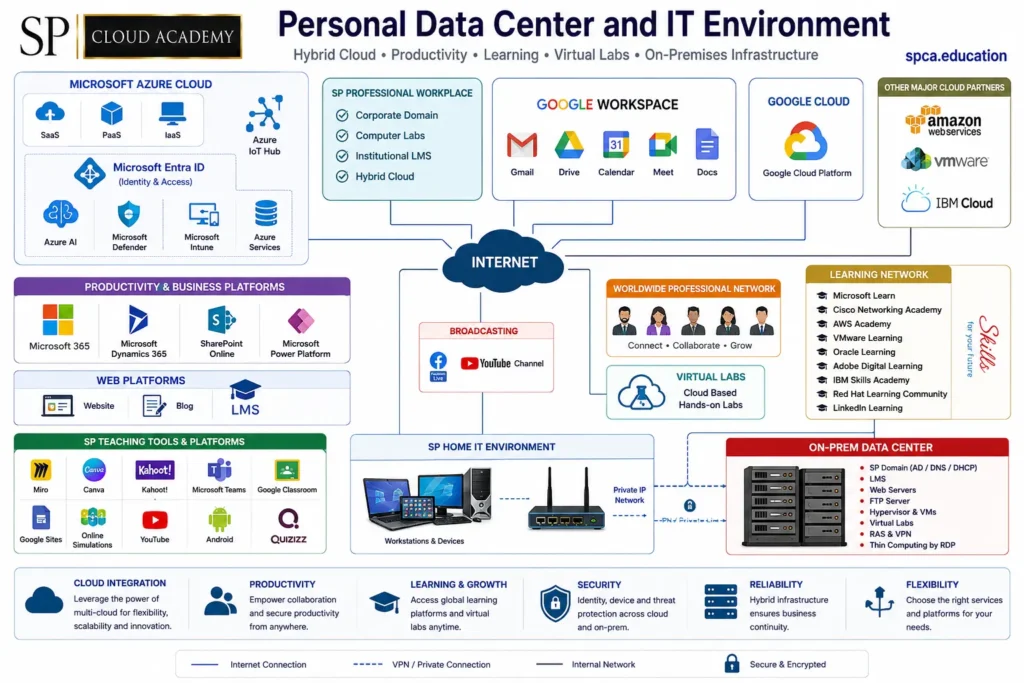
At its core, this kind of hybrid cloud ecosystem typically includes six connected layers:
- Public cloud platforms for scalable computing, storage, and AI services
- Identity and access management for secure authentication across every service
- Productivity and collaboration platforms for daily work and communication
- Web, teaching, and content platforms for publishing and education
- An on-premises data center for full control over sensitive workloads
- A home or office IT environment that connects everything through a private network
Together, these layers create an infrastructure that behaves like an enterprise-grade data center, but is flexible enough to be managed by an individual, a small business, or an education-focused organization.
Hybrid Cloud vs. Pure Cloud vs. Pure On-Premises
It helps to see how a hybrid approach compares to the two extremes many people start with. The table below summarizes the trade-offs across the factors that matter most when choosing an architecture.
| Factor | Pure Public Cloud | Pure On-Premises | Hybrid Ecosystem |
| Upfront cost | Low — pay as you go | High — hardware purchase | Moderate — spread over time |
| Data control | Limited — vendor-managed | Full — you own everything | Full control where it matters most |
| Scalability | Very high, instant | Limited by hardware | High — scale to cloud when needed |
| Maintenance effort | Low — vendor handles it | High — you handle it all | Balanced — shared responsibility |
| Best for | Fast-changing workloads | Sensitive or regulated data | Most individuals and small orgs |
Core Components of a Hybrid Cloud Ecosystem
1. Public Cloud Platforms
The public cloud layer is the backbone of most hybrid cloud ecosystems. Platforms such as Microsoft Azure, Google Cloud Platform, Amazon Web Services, VMware, and IBM Cloud provide on-demand computing through three core service models:
- SaaS (Software as a Service) — ready-to-use applications delivered over the internet, such as email or productivity suites
- PaaS (Platform as a Service) — managed environments for building and deploying applications without managing the underlying servers
- IaaS (Infrastructure as a Service) — virtual machines, storage, and networking that you configure and control directly
Beyond core compute, cloud platforms also extend into IoT connectivity (through services like Azure IoT Hub), artificial intelligence and machine learning services, and hybrid virtualization tools such as VMware, giving a personal data center the same scalability that large enterprises rely on. Most providers also offer a generous free tier or student credits, which makes this layer one of the easiest to start experimenting with before committing budget to it.
A practical tip: rather than spreading workloads thinly across four or five providers from day one, pick one primary cloud platform for core services and treat the others as secondary options for specific tools or backup redundancy. This keeps billing, security policies, and skill-building focused.
2. Identity, Access, and Security Management
No hybrid IT environment is complete without a strong identity layer. Services like Microsoft Entra ID centralize authentication across every connected platform, so a single sign-on covers cloud apps, on-premises resources, and even third-party tools. This is often called the “control plane” of a hybrid ecosystem, because almost every other layer depends on it for secure access.
Endpoint protection tools and device management services — such as Microsoft Defender and Microsoft Intune — keep devices, data, and identities protected whether traffic originates from the cloud or from an on-premises server. Together, identity and endpoint management let you enforce consistent policies such as multi-factor authentication, conditional access based on location or device health, and automatic patching across every machine in the environment.
3. Productivity and Collaboration Platforms
Daily operations run on productivity ecosystems such as Microsoft 365, Google Workspace, SharePoint Online, and Microsoft Dynamics 365. Email, shared drives, calendars, video meetings, and documents all live here, giving teams — even teams of one — a consistent way to collaborate from anywhere.
For organizations that run both Microsoft and Google ecosystems side by side, it is common to designate one platform as the primary system of record (for example, Microsoft 365 for internal documents and Google Workspace for public-facing collaboration or classroom tools) rather than duplicating every file and calendar across both.
4. Web, Broadcasting, and Teaching Platforms
For educators, content creators, and cloud academies, this layer includes a public website, blog, and learning management system (LMS), supported by teaching tools such as Canva, Kahoot!, Google Classroom, Microsoft Teams, Google Sites, and Quizizz. Live broadcasting through Facebook Live and YouTube extends the reach of training and community content even further, turning a personal IT environment into a full content and education delivery platform.
This layer is also where analytics matter most: page views on the blog, quiz completion rates in the LMS, and watch time on broadcast channels all feed back into decisions about what content or courses to build next.
5. On-Premises Data Center
Even in a cloud-first world, an on-premises data center still plays a critical role. A local server rack can host domain services (AD/DNS/DHCP), a learning management system, web and FTP servers, hypervisors and virtual machines, virtual labs, and remote access through RAS, VPN, or thin-client computing via RDP. This gives full control over sensitive data and mission-critical workloads that some organizations prefer to keep off the public cloud.
A hypervisor is usually the heart of this layer, since it lets one physical server run several isolated virtual machines — for example, a domain controller, a web server, and a sandboxed virtual lab — without needing separate hardware for each. This is also where thin computing via RDP becomes valuable: lightweight devices can connect to powerful virtual desktops hosted on the server rather than needing high-end hardware at every desk.
6. Home or Office IT Environment
Connecting everything together is the home or office IT environment: workstations, laptops, and a router that establishes a private IP network. A VPN or private link then bridges this private network securely to the on-premises data center, allowing remote work without exposing internal systems directly to the public internet.
In smaller setups, this can be as simple as a consumer router configured with a separate VLAN for IT equipment; in more advanced setups, a dedicated firewall appliance handles the VPN tunnel, giving finer control over which devices and ports are allowed to reach the data center.
Why Build a Hybrid Cloud Ecosystem?
Combining public cloud, on-premises infrastructure, and home networking is not just a technical exercise — it delivers measurable business and personal benefits:
- Cloud Integration — leverage the power of multi-cloud for flexibility, scalability, and innovation
- Productivity — empower collaboration and secure productivity from anywhere
- Learning and Growth — access global learning platforms and virtual labs anytime
- Security — apply identity, device, and threat protection consistently across cloud and on-premises systems
- Reliability — hybrid infrastructure ensures business continuity even if one layer fails
- Flexibility — choose the right mix of services and platforms for your specific needs
None of these benefits depend on having a large budget or a dedicated IT team. They come from the architecture itself — from deliberately connecting cloud, on-premises, and home systems rather than treating them as separate, unrelated tools.
How to Build Your Own Personal Data Center and IT Environment
Building a hybrid cloud ecosystem does not have to happen overnight. A phased, step-by-step approach keeps the project manageable while still moving toward a fully integrated environment.
- Start with identity and access management. Set up a centralized identity provider so every cloud and on-premises service authenticates through one secure system.
- Choose your primary public cloud platform. Most personal and small-business environments standardize on one major provider — such as Microsoft Azure or Google Cloud — for core SaaS, PaaS, and IaaS needs.
- Deploy your productivity suite. Microsoft 365 or Google Workspace should cover email, file storage, calendars, and meetings from day one.
- Build or upgrade your on-premises server. Even a modest server running a hypervisor can host domain services, virtual labs, and a web or LMS platform.
- Secure your home or office network. Configure a private IP network behind your router, then connect it to your data center using a VPN or private link rather than exposing services directly to the internet.
- Layer in teaching, content, and broadcasting tools. Add an LMS, blog, and social broadcasting channels if publishing or education is part of your goals.
- Document your architecture. Keep a simple diagram of every connected system so you can audit security, plan upgrades, and onboard new team members quickly.
Security and Reliability Best Practices
A hybrid environment is only as strong as its weakest connection point. Keep these practices in mind as your infrastructure grows:
- Always encrypt traffic between your home network and on-premises data center using a VPN or private link
- Apply multi-factor authentication across every cloud and on-premises login
- Patch and monitor on-premises servers with the same discipline as cloud resources
- Use device and threat management tools to maintain visibility across every endpoint
- Back up critical data across both cloud and on-premises locations to protect against outages
Learning and Growth Within Your IT Ecosystem
One of the most overlooked benefits of a hybrid cloud ecosystem is continuous learning. Platforms such as Microsoft Learn, AWS Academy, VMware Learning, Oracle Learning, IBM Skills Academy, Red Hat Learning Community, Adobe Digital Learning, and LinkedIn Learning give administrators and learners a constant stream of new skills. Pairing this with cloud-based virtual labs allows hands-on practice without ever touching production systems, making it easier to test new configurations safely before rolling them out.
Cost Considerations: Budgeting for a Hybrid Environment
One of the biggest hesitations people have about building a personal data center is cost. In reality, a hybrid model often ends up cheaper than pure cloud at scale, and far more flexible than pure on-premises. Here is how the major cost categories typically break down:
- Cloud subscriptions — usage-based fees for compute, storage, and SaaS licenses; often the largest recurring cost as usage grows
- On-premises hardware — a one-time or occasional cost for a server, networking equipment, and storage drives
- Electricity and cooling — an ongoing but usually modest cost for running a small on-premises server continuously
- Software licenses — productivity suites, LMS platforms, and security tools, often billed per user or per device
- Internet and connectivity — a reliable connection and, if needed, a static IP or VPN service for remote access
A practical way to control costs is to start small: run non-critical services such as a test LMS or a personal blog on low-cost cloud tiers, while keeping only the most sensitive or frequently used workloads on-premises. As usage patterns become clear, you can shift specific services in either direction to optimize for cost and performance.
Common Mistakes to Avoid
Many hybrid IT projects run into the same avoidable problems. Watching for these early can save significant time and rework later:
- Skipping the identity layer first — bolting on centralized authentication after dozens of accounts already exist is far harder than starting with it
- Exposing the on-premises server directly to the internet instead of routing access through a VPN or private link
- Mixing personal and organizational data on the same accounts, which complicates both security and backups
- Underestimating backup needs — assuming the cloud or the on-premises server alone is “safe enough” without a second copy of critical data
- Adding too many platforms at once — spreading effort across five learning platforms or three clouds before mastering one
- Forgetting to document the architecture, which makes troubleshooting and onboarding new collaborators much slower
Frequently Asked Questions
Is a personal data center only for large organizations?
No. A personal data center can be built and managed by a single IT professional, freelancer, or educator. The scale changes, but the same principles — identity management, secure networking, and a mix of cloud and on-premises services — apply at any size.
Do I need to buy expensive server hardware to get started?
Not necessarily. Many hybrid environments start with a single modest server or even a repurposed desktop running a hypervisor, and expand hardware only as workloads grow. Cloud services can absorb demand spikes without any hardware investment at all.
How is data kept secure across so many connected platforms?
Security relies on a shared identity layer, encrypted VPN or private-link connections between networks, multi-factor authentication, and endpoint protection tools applied consistently across every device and service, rather than securing each platform in isolation.
Can I build this ecosystem gradually instead of all at once?
Yes — in fact, that is the recommended approach. Start with identity and a productivity suite, add a cloud platform, then layer in an on-premises server and private networking once the basics are stable.
What is the biggest advantage of hybrid over pure cloud?
Control over sensitive data and predictable costs for steady, always-on workloads, while still being able to burst into the public cloud for scalability, backups, or services that are impractical to self-host.
Conclusion
A personal data center and IT environment is no longer just a technical setup — it is a strategic ecosystem that blends public cloud platforms, identity management, productivity tools, on-premises infrastructure, and home networking into one connected system. By building it layer by layer and following strong security practices, individuals, educators, and small organizations can achieve the same reliability, flexibility, and scalability once reserved for large enterprises.
Whether your goal is running a private learning platform, supporting remote productivity, or simply future-proofing your own infrastructure, a well-designed hybrid cloud ecosystem gives you the foundation to grow with confidence.
See Also
-

Personal Data Center and IT Environment: A Complete Guide to Building a Hybrid Cloud Ecosystem
-
Data Center Models, Deployment, and Career: The Complete 2026 Guide
-

Multi-Cloud and Hybrid IT Infrastructure: A Modern Digital Ecosystem for Education and Enterprise
-
Personal IT Environment Development for R&D: A Complete Framework for On-Premises, Virtual, and Cloud Labs
-

Computer Lab Management: The Ultimate Guide to Performance, Security & Efficiency
-
Designing a Modern Multi-Cloud and Hybrid IT Infrastructure for Educational Institutions
-

Enterprise Computer Lab Setup: Windows Server, Virtual Machines, and Cloud Integration
-

NEXT GENERATION COMPUTER LABORATORY DESIGN, DEVELOPMENT & IMPLEMENTATION GUIDE
-

Edge + IoT: The Game-Changing Tech Duo Transforming Our Smart Future